18.04.2026 – Pavel Klavík, Kamila Klavíková
We have recently added Dark Mode into OrgPad, and it was much bigger task we originally anticipated. In this blog post, we discuss our experience and the problems we had to solve along the way. We discuss color spaces and design decisions behind OrgPad's new Dark Mode palette. We show how we manage color themes in ClojureScript and use color palettes in CSS. And we deal with inverting colors in MathJax math formulas, both in CSS and 2D canvas.
#development, #webdev, #OrgPad, #CSS, #tech, #dark mode, #2D canvas
We've released Dark Mode for OrgPad a few months back, and it was a gargantuan change. The work ended up being far bigger than we had expected. OrgPad’s dark palette now includes around 100 new colors, and the result looks really beautiful, much better than we originally imagined. The pull request ended up containing 155 commits across 285 files, with roughly 2.7k lines of code added. Since then, we’ve already made a few more fixes and improvements on top of it. And because OrgPad is fully written in Clojure and ClojureScript, those lines of code do a lot of heavy lifting.
In this article, we share how we solved key problems. We hope that it helps you with your own projects. One good example is math formulas on the web. A common approach is to use MathJax, which converts LaTeX sources into SVG images. Those formulas are often rendered in black, which makes them hard or impossible to read in dark mode.
This problem appears on many websites. For example, the accepted answer in one Stack Overflow discussion says that because the formulas are images, nothing can be done. This is simply wrong. A straightforward solution using the CSS filter property has been available since 2016:
@media (prefers-color-scheme: dark) {
  .math {
    filter: invert(0.7) hue-rotate(180deg) brightness(1.2) contrast(1.2);
  }
}When designing dark mode, choosing the right color space becomes critical. Different color spaces describe colors in different ways, and some make it much easier to reason about relationships between colors. For a broader overview, see Axel Thevenot’s excellent article on color spaces.
We review here three color spaces: RGB, HSL and okLCH. We created most of OrgPad's dark mode palette in HSL, and later moved to okLCH.
The best-known color space is RGB, where each color is described by three coordinates: R for red, G for green and B for blue. These values are usually integers between 0 and 255, or floats between 0 and 1. For example, OrgPad's blue title color is  . RGB colors can also be written in hexadecimal format as
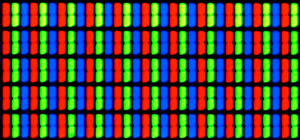
 #RRGGBB, so the same blue is #2F7BA7. The RGB model matches how screens produce color by combining red, green, and blue light. If you zoom in on a display, you can see these subpixels directly.
RGB is simple and closely tied to hardware. Unfortunately, it’s not intuitive for people. Consider the following three colors from OrgPad's palette:
#2F7BA7, the blue title color#B6E5FF#7654ADHow are they related? Looking at these values, it’s hard to tell. You cannot easily see that the second color is the matching blue background color, and the third color is a purple title color.
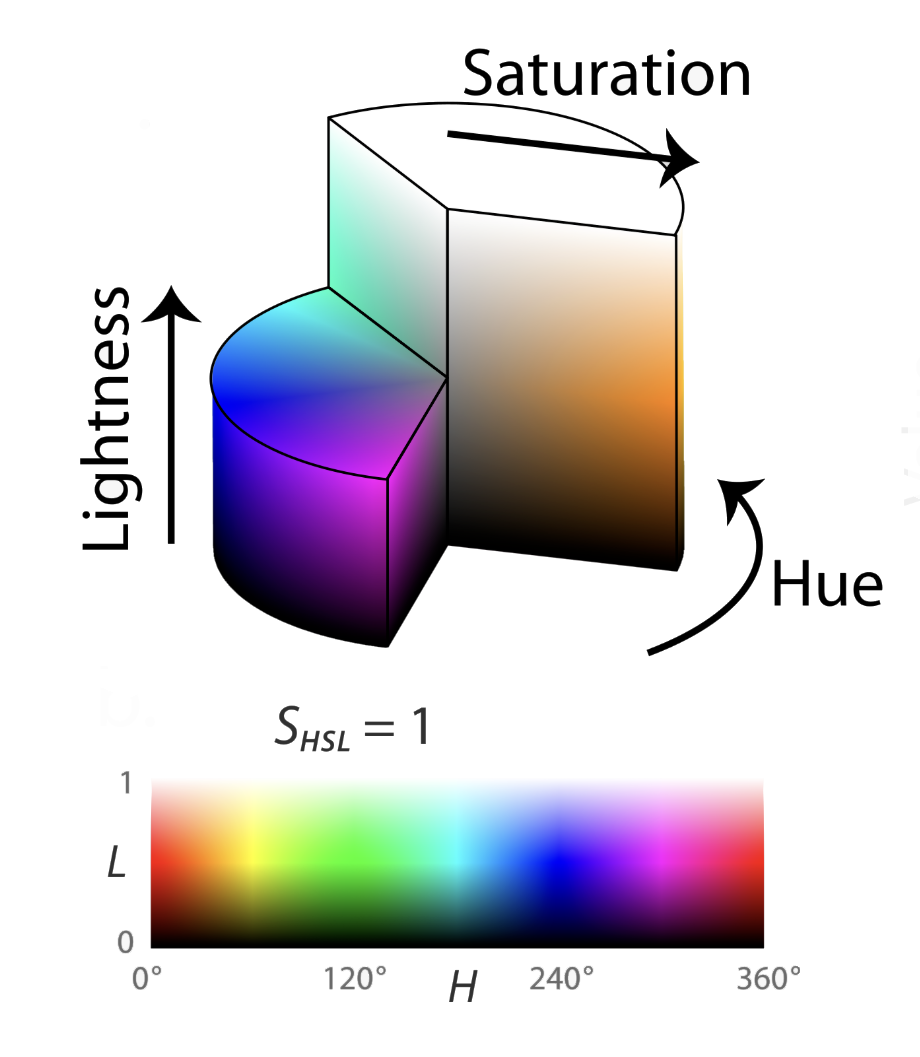
For this reason, many color spaces are organized around more understandable parameters. One of them is HSL, introduced in 1978 in the classic paper Color spaces for computer graphics. It consists of hue, saturation, and lightness:
#FF0000).Geometrically, HSL color space is a cylinder where hue describes the angle, saturation the distance from the center and lightness the height from the bottom. The bottom face is fully black and the top one is fully white.
Let's take a look at the same OrgPad's colors again:
 ,
, ,
, .
.Now the relationships become obvious. Both blue colors share nearly the same hue, while the purple shifts along the spectrum. The background blue is also much lighter and more saturated.
You can specify HSL colors directly in CSS and elsewhere in the browser. For example, OrgPad's blue title color can be written as hsl(202 0.561 0.42).
Converting between RGB and HSL is also straightforward. Here is a Clojure implementation for converting HSL to RGB:
(defn hsl->rgb
  "Converts the given [h s l] color into [r g b] vector. We assume that h is an integer
   in [0, 359], and both s and l are floats in [0, 1]. The resulting RGB color is
   an integer vector in [0, 255]^3.

   Based on https://en.wikipedia.org/wiki/HSL_and_HSV#HSL_to_RGB_alternative, also see
   https://stackoverflow.com/questions/2353211/hsl-to-rgb-color-conversion."
  [[h s l]]
  (let [a (* s (min l (- 1 l)))
        f (fn [n]
            (let [k (mod (+ n (/ h 30)) 12)
                  t (max (min (- k 3) (- 9 k) 1) -1)]
              (- l (* a t))))]
    [(math/round (* 255 (f 0)))
     (math/round (* 255 (f 8)))
     (math/round (* 255 (f 4)))]))

(defn hsl->hex*
  "Converts the given [h s l] color into RGB hex string #RRGGBB. We assume
   that h is an integer in [0, 359], and both s and l are floats in [0, 1].
   The optional alpha is appended to the hex value."
  ([hsl-color] (hex (hsl->rgb hsl-color)))
  ([hsl-color alpha] (hex (hsl->rgb hsl-color) alpha)))
The reverse conversion from RGB back to HSL is simple as well:
(defn rgb->hsl
  "Converts the given [r g b] color into [h s l] vector, where RGB is in [0, 255].
   The output HSL vector has h as an integer in [0, 359], and both s and l
   are floats in [0, 1].

   Based on https://en.wikipedia.org/wiki/HSL_and_HSV#From_RGB, also see
   https://stackoverflow.com/questions/2348597#54071699."
  [[r g b]]
  (let [max-val (max r g b)
        min-val (min r g b)
        diff (- max-val min-val)
        f (- 1 (abs (+ max-val min-val -1)))
        h (cond (= max-val min-val) 0
                (= max-val r) (/ (- g b) diff)
                (= max-val g) (+ 2 (/ (- b r) diff))
                :else (+ 4 (/ (- r g) diff)))
        h' (math/round (* (if (neg? h) (+ h 6) h) 60))
        s (if (zero? f) 0 (float (/ diff f)))
        l (float (math/avg min-val max-val))]
    [h' s l]))
By contrast, okLCH is relatively new. It was introduced in 2020, became part of web standards soon after in 2021, and is now widely supported across modern browsers. It consists of three parameters: lightness, chroma and hue. They work similarly to HSL, but the order of parameters is reversed.
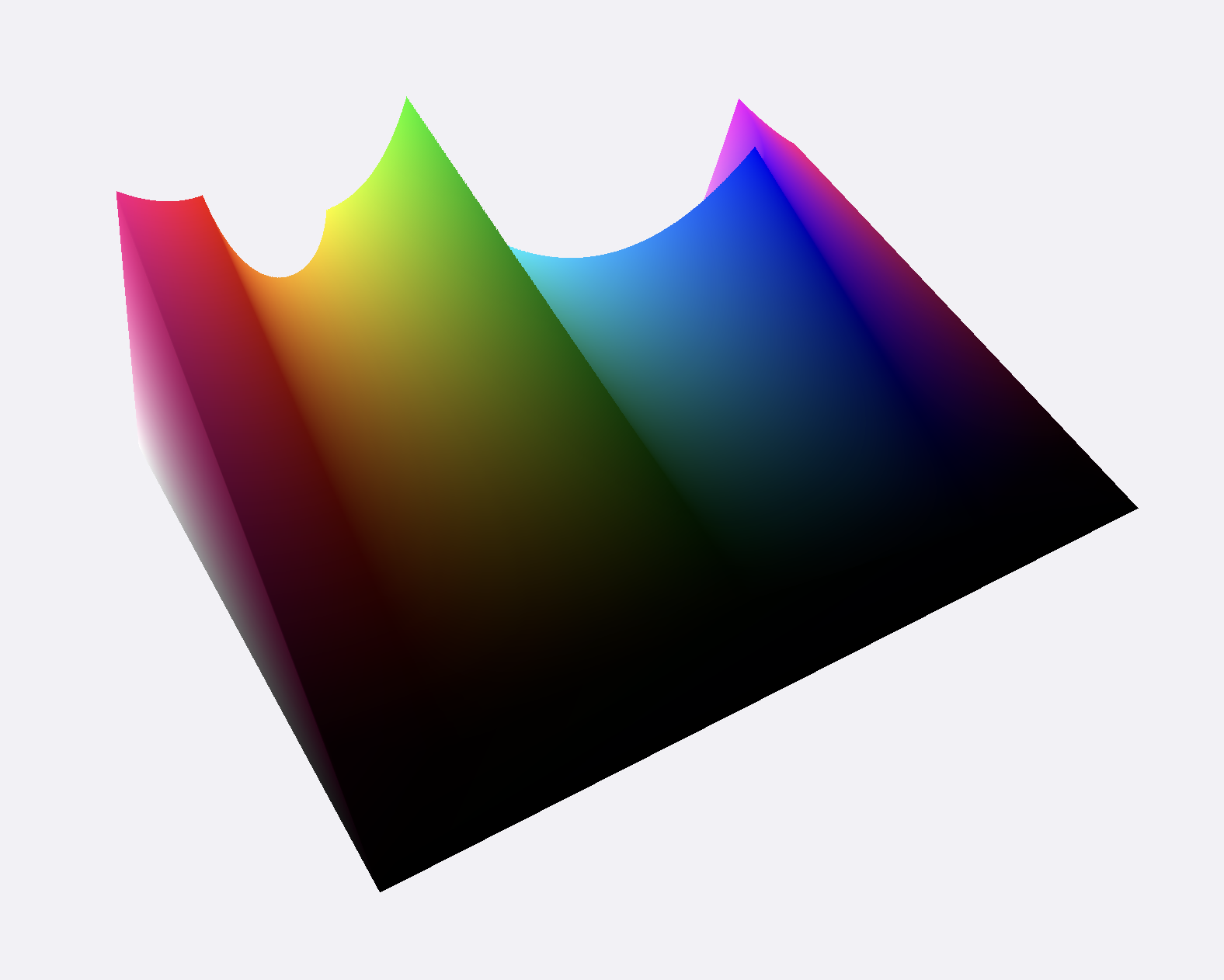
okLCH is based on research into human vision and perception. For example, it is well known that, due to evolutionary history, we can perceive many more shades of green than of other colors. And when saturation or lightness changes linearly, the perceived effect is not linear. You can experiment with these parameters yourself at https://oklch.com. The entire color space, visualized in 3D, is more complex:
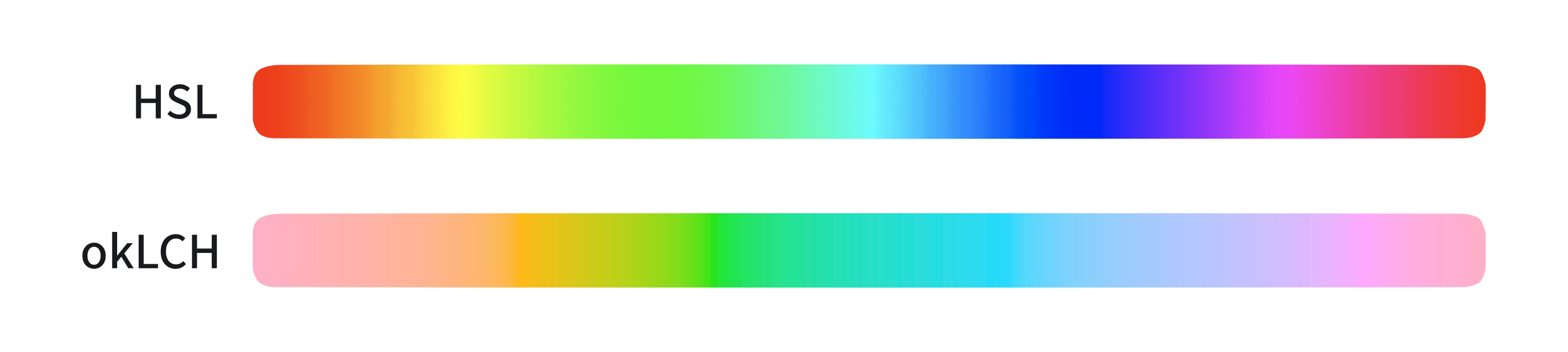
Consider the color spectrum as defined in HSL and okLCH. The color spectrum in HSL is much more uneven, with visible vertical bands around certain colors. This unevenness makes it harder to create consistent palettes. In okLCH, the spectrum changes evenly.
When we started working on the dark mode palette, we did not know okLCH existed, so we used HSL instead. We only discovered okLCH near the end, when most of the palette was already done. We are now storing our palette in okLCH, which will make future modifications easier. If you want to dive deeper, this article about okLCH in CSS is a great resource.
okLCH colors can be used directly in CSS and elsewhere in the browser. For example, OrgPad's blue title color is described as oklch(0.8975 0.0603 232.51).
Converting between RGB and okLCH is more involved because it involves multiple steps and many constants. Further, okLCH color space is larger, so it can describe colors which cannot be represented in RGB. That means we have to cap the RGB coordinates at the end. Conversion works in the following steps:
RGB ↔ linear sRGB ↔ okLab ↔ okLCH.
This converts between RGB and linear sRGB:
(def ^:private linear-threshold 0.04045)
(def ^:private linear-divider 12.92)
(def ^:private linear-exponent 2.4)
(def ^:private linear-shift 0.055)

(defn- rgb->linear
  "Converts the given integer color coordinate between 0 and 255 to
   linear-light [0, 1] range according to sRGB transfer function
   (IEC 61966-2-1): https://en.wikipedia.org/wiki/SRGB."
  [color-coord]
  (let [ratio (/ color-coord 255.0)]
    (if (> ratio linear-threshold)
      (math/pow (/ (+ ratio linear-shift) (inc linear-shift)) linear-exponent)
      (/ ratio linear-divider))))

(defn linear->rgb
  "Converts the given linear-light [0, 1] range according to integer
  color coordinate between 0 and 255 by inverting sRGB transfer function
  (IEC 61966-2-1): https://en.wikipedia.org/wiki/SRGB."
  [linear]
  (let [ratio (if (> linear (/ linear-threshold linear-divider))
                (- (* (inc linear-shift) (Math/pow linear (/ linear-exponent)))
                   linear-shift)
                (* linear linear-divider))]
    (math/cap (math/round (* ratio 255)) 0 255)))
Converting linear sRGB into okLab consists of three steps. The first step is linear, multiplying the coordinates by a 3×3 matrix. Then comes the non-linear step of taking the cube root of the output. Finally, another linear step multiplies the values by a second 3×3 matrix.
(defn linear->oklab
  "Converts the given [r g b] vector in linear-light in range [0, 1] (may be
   outside slightly). Returns the corresponding [L a b] vector.
   See https://bottosson.github.io/posts/oklab/."
  [[r g b]]
  (let [l (+ (* 0.4122214708 r) (* 0.5363325363 g) (* 0.0514459929 b))
        m (+ (* 0.2119034982 r) (* 0.6806995451 g) (* 0.1073969566 b))
        s (+ (* 0.0883024619 r) (* 0.2817188376 g) (* 0.6299787005 b))
        l-root (math/cbrt l)
        m-root (math/cbrt m)
        s-root (math/cbrt s)]
    [(+ (* 0.2104542553 l-root) (* 0.7936177850 m-root) (* -0.0040720468 s-root))
     (+ (* 1.9779984951 l-root) (* -2.4285922050 m-root) (* 0.4505937099 s-root))
     (+ (* 0.0259040371 l-root) (* 0.7827717662 m-root) (* -0.8086757660 s-root))]))
Since these matrices are invertible, to convert in the opposite way, we just need to do inverting steps in the opposite order:
(defn oklab->linear
  "Converts the given [L a b] Oklab vector into linear-light sRGB [r g b]
   (can be outside [0, 1]). See https://bottosson.github.io/posts/oklab/."
  [[L a b]]
  (let [l-root (+ L (* 0.3963377774 a) (* 0.2158037573 b))
        m-root (+ L (* -0.1055613458 a) (* -0.0638541728 b))
        s-root (+ L (* -0.0894841775 a) (* -1.2914855480 b))
        l (* l-root l-root l-root)
        m (* m-root m-root m-root)
        s (* s-root s-root s-root)]
    [(+ (* 4.0767416621 l) (* -3.3077115913 m) (* 0.2309699292 s))
     (+ (* -1.2684380046 l) (* 2.6097574011 m) (* -0.3413193965 s))
     (+ (* -0.0041960863 l) (* -0.7034186147 m) (* 1.7076147010 s))]))
Last, we need to convert between okLab and okLCH. This is simply just a transformation of  in Cartesian coordinates into
  in polar coordinates. We already have helper functions for this in OrgPad.
(defn oklch->oklab
  "Converts okLCH [L C h], with hue in degrees, into Oklab [L a b]."
  [[L C h]]
  (let [rad (geom/angle->rad {:deg h})
        a (* C (math/cos rad))
        b (* C (math/sin rad))]
    [L a b]))

(defn oklab->oklch
  "Converts Oklab [L a b] into okLCH [L C h], with hue in degrees in [0, 360)."
  [[L a b]]
  (let [C (geom/norm [a b])
        h (geom/angle->deg (geom/angle [a (- b)]))]
    [L C (if (neg? h) (+ h 360.0) h)]))
To convert between RGB and okLCH, we just need to do all these steps at once. We can do this elegantly using Clojure threading macro:
(defn oklch->rgb
  "Converts okLCH [L C h] into [r g b], each in [0, 255], clipped."
  [oklch]
  (->> oklch oklch->oklab
       oklab->linear
       (mapv linear->rgb)))

(defn oklch->hex*
  "Converts the given okLCH [L C h] color into RGB hex string #RRGGBB.
   We assume that h is in degrees between [0, 360), and both L and C
   are floats. The optional alpha is appended to the hex value."
  ([oklch] (hex (oklch->rgb oklch)))
  ([oklch alpha] (hex (oklch->rgb oklch) alpha)))

(defn rgb->oklch
  "Converts RGB [r g b] (in [0, 255]) into OKLCH [L C h]."
  [color]
  (let [rgb (or (color->point color)
                (color-with-alpha->point color))]
    (->> rgb (mapv rgb->linear)
         linear->oklab
         oklab->oklch)))
All colors in OrgPad are defined in okLCH. They are stored in a single Clojure map colors, which is used throughout the codebase.
(def colors
  "The map of all colors."
  #:color{:text          (oklch->hex [0.2228 0.0079 274.57])
          :dm-text       (oklch->hex [0.9271 0.004  106.48])
          :bg            (oklch->hex [0.964  0.0029 264.54])
          :dm-bg         (oklch->hex [0.2424 0.0056 106.81])
          :paper         (oklch->hex [1.0    0.0     89.88])
          :dm-paper      (oklch->hex [0.3471 0.0068 106.75])
          :paper-text    (oklch->hex [0.5999 0.0     89.88])
          :dm-paper-text (oklch->hex [0.6401 0.0     89.88])
          ;; and many more colors
          )
Each light mode color has a matching dark mode variant stored under the same name with the dm- prefix.
For cells and links, we need several related colors: title color, background color, fill color, and others. These are defined separately for each of 15 base colors, such as :color/blue or :color/purple. They are then merged into colors map with the appropriate suffixes.
:color/blue   #:color{:unit-bg-color       (oklch->hex [0.8975 0.0603 232.51])
                      :unit-title-color    (oklch->hex [0.556  0.1004 237.99])
                      :link-color          (oklch->hex [0.655  0.1229 238.78])
                      :fill-color          (oklch->hex [0.8975 0.0603 232.51])
                      :dm-unit-bg-color    (oklch->hex [0.534  0.0589 248.98])
                      :dm-unit-title-color (oklch->hex [0.9295 0.0478 211.15])
                      :dm-link-color       (oklch->hex [0.6275 0.1321 251.0])
                      :dm-fill-color       (oklch->hex [0.4357 0.0692 249.68])
                      :dm-shadow-color     (oklch->hex [0.7959 0.1076 249.31])
                      :dm-code-color       (oklch->hex [0.6965 0.1067 214.38])}
:color/purple #:color{:unit-bg-color       (oklch->hex [0.8574 0.0812 302.34])
                      :unit-title-color    (oklch->hex [0.5231 0.138  299.22])
                      :link-color          (oklch->hex [0.6576 0.2116 298.11])
                      :fill-color          (oklch->hex [0.8574 0.0812 302.34])
                      :dm-unit-bg-color    (oklch->hex [0.5088 0.0809 302.93])
                      :dm-unit-title-color (oklch->hex [0.9253 0.0578 323.34])
                      :dm-link-color       (oklch->hex [0.5647 0.2151 307.38])
                      :dm-fill-color       (oklch->hex [0.3996 0.1164 309.25])
                      :dm-shadow-color     (oklch->hex [0.74   0.1458 310.06])
                      :dm-code-color       (oklch->hex [0.6591 0.11   323.93])}
So what is oklch->hex? For faster rendering, smaller code and simpler computations in animations, we store colors as RGB hex strings rather than as okLCH coordinates.
We have already seen oklch->hex*, the function that converts an okLCH color to a RGB hex string. oklch->hex is a simple Clojure macro wrapping oklch->hex*. If the input consists of numerical constants, it runs oklch->hex* at compile time and the call is replaced with the resulting hex string. Otherwise, oklch->hex* runs in runtime.
(defn- literal-color?
  "Returns true if the given color vector consists of three numerical constants."
  [color]
  (and (vector? color) (= (count color) 3) (every? number? color)))

(defmacro oklch->hex
  "Converts the given okLCH [L C h] color into RGB hex string #RRGGBB. We assume
   that h is in degrees between [0, 360), and both L and C are floats. The optional
   alpha is appended to the hex value. If input is given as constants, the result
   is computed in compile time."
  ([oklch]
   (if (literal-color? oklch)
     (oklch->hex* oklch)
     `(oklch->hex* ~oklch)))
  ([oklch a]
   (if (and (literal-color? oklch) (number? a))
     (oklch->hex* oklch a)
     `(oklch->hex* ~oklch ~a)))))
So we actually store this in OrgPad's binary. The function oklch->hex* is not even included in OrgPad's client production code, optimized by advanced compilation and tree shaking.
 :color/blue   #:color{:unit-bg-color       "#b6e5ff"
                       :unit-title-color    "#2f7ba7"
                       :link-color          "#399ad3"
                       :fill-color          "#b6e5ff"
                       :dm-unit-bg-color    "#52708e"
                       :dm-unit-title-color "#c4f1fa"
                       :dm-link-color       "#448cd5"
                       :dm-fill-color       "#325476"
                       :dm-shadow-color     "#85c2ff"
                       :dm-code-color       "#39aec6"}
 :color/purple #:color{:unit-bg-color       "#dac4fd"
                       :unit-title-color    "#7654ad"
                       :link-color          "#a46bff"
                       :fill-color          "#dac4fd"
                       :dm-unit-bg-color    "#6f5a8c"
                       :dm-unit-title-color "#fadafd"
                       :dm-link-color       "#9844d5"
                       :dm-fill-color       "#5a3276"
                       :dm-shadow-color     "#c78fef"
:dm-code-color "#b37ab8"}Dark mode in OrgPad is not just an inverted light theme. It’s an intentional redesign. The goal was simple in theory, but demanding in practice: keep content readable during long sessions, both during the day and at night, while making the interface feel genuinely beautiful.
Most dark modes rely on blue-gray or near-black backgrounds. We didn’t.
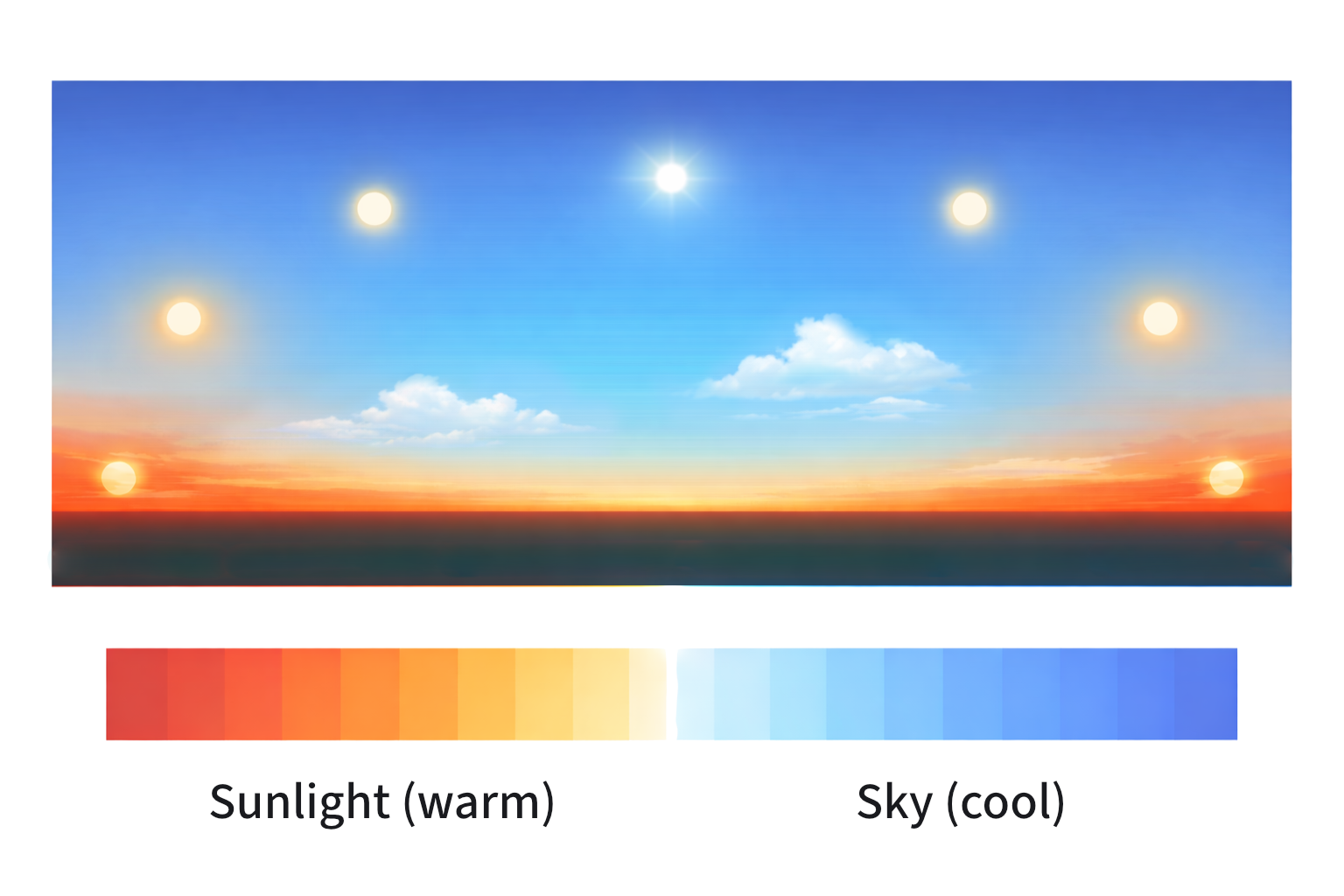
At night, people usually work under warm artificial light, not daylight reflected from the sky. A cold blue-gray background clashes with that environment and feels harsh. That is why OrgPad’s dark mode has a subtle yellow tint. It fits better with warm lamplight and feels calmer to the eye.
This was not just a design hunch. We tested colder variants and kept seeing the same result: blue-gray dark modes felt off. The warmer base simply worked better.
By contrast, OrgPad's light mode uses cooler bluish tints for background and grayish cells. In that sense, the two themes complement each other: dark text on light background versus light text on dark background, cold light versus warm light.
In OrgPad, foreground elements are lighter than the background. This reflects how light works in the physical world. Objects closer to us catch more light, while distant surfaces stay darker.
That subtle difference helps create a natural sense of depth without heavy borders or strong outlines. Even on a busy canvas, your eyes can quickly tell where to focus.
OrgPad’s dark mode is lighter than what you might be used to. That choice is intentional.
Extremely dark backgrounds tend to create a “black hole” effect. Colors lose their character, and many elements start to collapse into similar dark shades. Human vision is simply less sensitive to differences in dark tones, so the usable color range becomes narrower.
A lighter background preserves more distinction between colors and makes them feel more natural. Pictures, charts, and embedded content stay readable without extreme contrast or awkward adjustments. Dark mode should support thinking, not fight with your material.
Accessibility is often treated as an afterthought. Getting everything perfect is expensive and not always realistic for a small team. Still, many improvements are simple and benefit everyone.
For dark mode in OrgPad, readability was the priority. Text, buttons, icons, and links must clearly stand out from the background. Low contrast causes problems for many people—those with weaker eyesight, color vision deficiencies, or just tired eyes late in the day.
Colors look different to everyone, so you can't rely on gut feeling. That is why accessibility standards matter. They help you make decisions based on measurable rules, not personal taste.
The most widely used accessibility standard today is WCAG 2 (Web Content Accessibility Guidelines). It defines minimum contrast ratios between text and background. If you meet the ratio, the content is considered readable. These rules are part of broader web standards and are widely adopted.
But WCAG 2 has limits. It reduces contrast to a single number, while human vision is more complex. Some combinations fail the test but still look fine. Others pass but feel hard to read.
A typical example is blue backgrounds. White text on blue often fails WCAG 2, while black text passes—even though many people find the white version easier to read.
Because of these issues, better approaches are emerging. One of them is APCA (Advanced Perceptual Contrast Algorithm).
Instead of a simple number, APCA models how people actually perceive contrast. It considers text size, weight, and background brightness, making it more accurate.
APCA is not an official standard yet, but it's a step in the right direction. Accessibility should match real human perception, not just satisfy a formula.
WCAG 2 and APCA focus on contrast between foreground and background. They do not check whether colors in your palette can be distinguished from each other.
For that, color hierarchy matters:
A quick test is to switch your design to grayscale. If elements become indistinguishable, the palette needs adjustment. This also reveals whether your visual hierarchy is working—the most important thing should stand out the most.
Chrome DevTools can simulate vision deficiencies. Open DevTools (F12 or right-click and select Inspect from menu), go to the Rendering tab, and use “Emulate vision deficiencies.” It helps you quickly see how your UI behaves for different users.
One of the best external tools we've found is Coloring for Colorblindness by David Nichols. It shows multiple types of color vision deficiencies at once.
Extreme contrast is not always better. For example, pure black (#000000) on pure white (#FFFFFF) may sound ideal, but often causes eye strain. The sharp jump in brightness can lead to fatigue or a shimmering effect (halation), especially during long reading sessions. Softer combinations—such as off-black text on white or slightly muted backgrounds—are gentler on most people's eyes.
Color in OrgPad is everywhere. Cells, text, links, buttons, and backgrounds all interact. Every combination needs to stay readable.
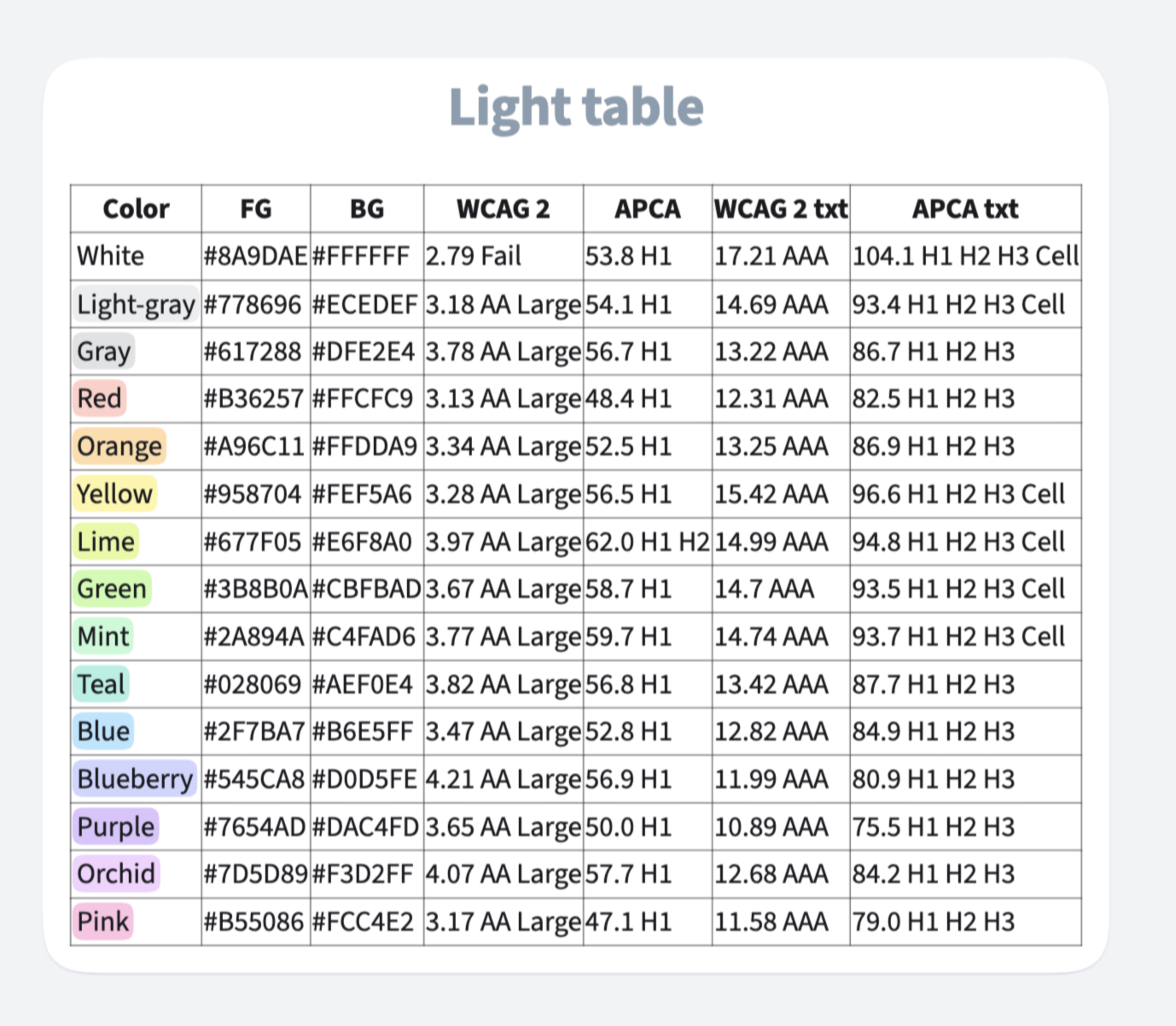
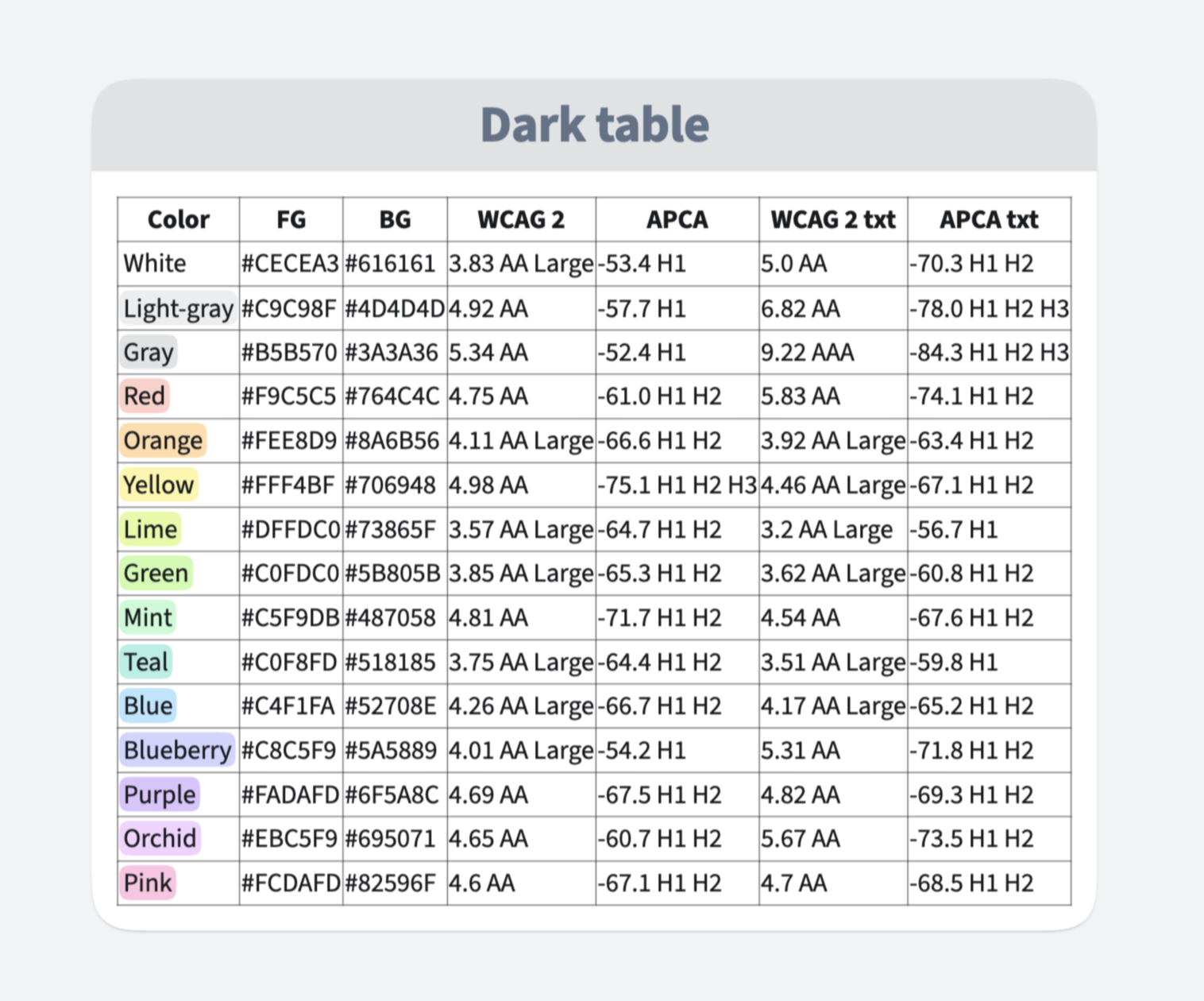
Checking this manually would be slow and error-prone, so we automated it. We wrote simple Clojure code that evaluates contrast across the system. It checks combinations such as:
Each pair is evaluated using both WCAG 2 and APCA. This immediately shows what is safe, borderline, or problematic.
Here is the Clojure code for computing WCAG 2 contrast:
(defn- to-linear
  "Converts the given color coordinate to the luminance factor:
  https://www.w3.org/WAI/GL/wiki/Relative_luminance."
  [color-coord]
  (let [ratio (/ color-coord 255.0)]
    (if (> ratio 0.03928)
      (math/pow (/ (+ ratio 0.055) 1.055) 2.4)
      (/ ratio 12.92))))

(defn- relative-luminance
  "Calculate relative luminance for WCAG 2.0:
   https://www.w3.org/WAI/GL/wiki/Relative_luminance."
  [[r g b]]
  (+ (* 0.2126 (to-linear r))
     (* 0.7152 (to-linear g))
     (* 0.0722 (to-linear b))))

(defn wcag-contrast
  "Calculate WCAG 2.0 contrast ratio between two colors."
  [color1 color2]
  (let [l1 (relative-luminance (or (colors/color->point color1)
                                   (colors/color-with-alpha->point color1)))
        l2 (relative-luminance (or (colors/color->point color2)
                                   (colors/color-with-alpha->point color2)))
        lighter (max l1 l2)
        darker (min l1 l2)]
    (/ (+ lighter 0.05) (+ darker 0.05))))
Similarly, this computes APCA contrast:
(defn- srgb->apcaY
  [c]
  (let [n (/ c 255.0)
        base (math/pow n 2.4)]
    (if (< base 0.022)
      (+ base (math/pow (- 0.022 base) 1.414))
      base)))

(defn- apca-luminance
  [r g b]
  (+ (* 0.2126729 r) (* 0.7151522 g) (* 0.0721750 b)))

(defn apca-contrast
  "Calculate APCA (Accessible Perceptual Contrast Algorithm) contrast using
   the sRGB-Y algorithm. Returns Lc value: positive for dark text on light bg,
   negative for light text on dark bg.

   Reference: https://git.apcacontrast.com/documentation/APCAeasyIntro.html
   https://git.apcacontrast.com/documentation/ImportantChangeNotices.html"
  [color1 color2]
  (let [[r1 g1 b1] (or (colors/color->point color1)
                       (colors/color-with-alpha->point color1))
        [r2 g2 b2] (or (colors/color->point color2)
                       (colors/color-with-alpha->point color2))
        y-fg (apca-luminance (srgb->apcaY r1) (srgb->apcaY g1) (srgb->apcaY b1))
        y-bg (apca-luminance (srgb->apcaY r2) (srgb->apcaY g2) (srgb->apcaY b2))
        c-base 1.14
        c (if (> y-bg y-fg)
            (* c-base (- (math/pow y-bg 0.56) (math/pow y-fg 0.57)))
            (* c-base (- (math/pow y-bg 0.65) (math/pow y-fg 0.62))))
        c-final (cond (< (abs c) 0.1) 0
                      (> c 0) (- c 0.027)
                      :else (+ c 0.027))]
    (* c-final 100)))
We feed these results directly into tables inside OrgPad.
This brings two key benefits. It speeds up development and improves consistency. Instead of guessing, we get immediate feedback on every color decision.
Dark mode in OrgPad is designed the same way as everything else. Accessibility is built in, not added later as a last-minute fix. And code is one of the tools we use for design, not just for implementation. But that would deserve a whole article of its own.
This is where dark mode moves from design into implementation. For a simple website, such as a blog, dark mode can be handled entirely in CSS. You can use the prefers-color-scheme media query to override colors when dark mode is preferred:
.element {
  background-color: #ffffff;
  color: #111827;
}

@media (prefers-color-scheme: dark) {
  .element {
    background-color: #0b1020;
    color: #e5e7eb;
  }
}
For anything larger, this approach does not scale well. Instead, it is better to define a color palette using CSS variables.
We define variables for light mode on the :root element. When dark mode is preferred, we override them with dark equivalents. All styles then use these variables.
:root {
  --color-bg: #ffffff;
  --color-text: #111827;
}

@media (prefers-color-scheme: dark) {
  :root {
    --color-bg: #0b1020;
    --color-text: #e5e7eb;
  }
}

.element {
  background-color: var(--color-bg);
  color: var(--color-text);
}For an application, we want to add the color scheme into settings. The default follows the browser, but user can still override this choice. There are three options: system default, light mode, and dark mode.
When system default is selected, we watch for changes and update the color scheme accordingly.
This can be easily achieved in JS. To detect preferred color scheme, we can use window.matchMedia function. In OrgPad, we store the selected mode both per device and per user. Here is our ClojureScript code which initiates color scheme in OrgPad:
(def preferred-dark-mode
  "Media query for the preferred color scheme."
  (.matchMedia js/window "(prefers-color-scheme: dark)"))

(defn init
  "Initiates dark-mode according to device's mode, user's mode,
   or preferred mode in browser/OS."
  [effects]
  (let [{device-dark-mode :device/dark-mode
         :as              device} (db-get/device effects)
        {user-dark-mode :user/dark-mode
         :as            user} (db-get/user effects)
        existing-dark-mode (or (contains? user :user/dark-mode)
                               (contains? device :device/dark-mode))
        default-dark-mode (.-matches preferred-dark-mode)]
    (store effects (if existing-dark-mode
                     (or device-dark-mode user-dark-mode)
                     default-dark-mode))))
To watch for changes in preferred color scheme, we can add an event listener to the MediaQueryList object. It just calls the init function again.
(.addEventListener preferred-dark-mode "change"
                   #(rf/dispatch [:app-state/refresh-system-dark-mode]))

(rf/reg-event-fx
  :app-state/refresh-system-dark-mode
  [clean/effects]
  (fn [effects _]
    (init effects)))
When the user changes the color scheme manually, we update app's color scheme, store the new choice locally at the client and also send the new value to the server via WebSocket messages:
(defn set-dark-mode
  "Sets dark-mode to the given value. Also stores new-dark-mode at device
   and user (when logged in)."
  [effects new-dark-mode]
  (cond-> effects true (store new-dark-mode)
          true (db-update/device assoc :device/dark-mode new-dark-mode)
          (db-get/user effects) (db-update/user assoc :user/dark-mode new-dark-mode)
          true (ws/add-message [:device/store-dark-mode new-dark-mode])
          (db-get/user effects) (ws/add-message [:user/store-dark-mode new-dark-mode])))
It remains to show what happens when app's color scheme updates. Since OrgPad's rendering process is quite involved, we have to update it in several places:
window.requestAnimationFrame function. Frame-anim handles spring animations, frame geometry, and rendering of the current frame on a 2D canvas. In other words, it knows which cells and links are currently visible, manages their animated state, and draws the scene. When switching the color scheme, it resets all canvas cell caches, updates colors in all spring animations, and redraws the scene.dm class to the root <html> node. In light mode, we remove it.(defn store
"Stores the given dark-mode in Re-frame DB, Frame-anim DB (where
all colors and caches are updated accordingly) and also mutates the HTML
node to include/exclude dm class for correct colors in CSS."
[effects new-dark-mode]
(-> effects (db-assoc/dark-mode new-dark-mode)
orgpage-placement/reload-all-thumbnails
style-select-anim/reset-all-colors
(fa-rf/add-op [:app-state/set-dark-mode new-dark-mode])
((if new-dark-mode
node/add-class
node/remove-class) (.-documentElement js/document) "dm")))
In OrgPad's CSS file, we use the same trick of having different color palettes for light and dark mode. But instead of a media query, it depends on existence of the dm class.
:root {
  --color-light-gray-bg: #ecedef;
  --color-orange-fill: #ffdda9;
  --color-red-shadow: #b36257;
  --color-teal-bg: #aef0e4;
  --color-blueberry: #545ca8;
  --color-blueberry-code: #545ca8;
  /* and 127 more light colors */
}

.dm {
  --color-light-gray-bg: #4d4d4d;
  --color-orange-fill: #734e35;
  --color-red-shadow: #e87d7d;
  --color-teal-bg: #518185;
  --color-blueberry: #c8c5f9;
  --color-blueberry-code: #87b3ee;
  /* and 127 more dark colors */
}
Then we use these variables everywhere. For example, we style Material-ui blue button like this. We have to use !important everywhere since Mui is injecting their styles into CSS with higher precedence.
.MuiButton-text-blue {
  color: var(--color-mui-blue) !important;
}

.MuiButton-text-blue:hover {
  background-color: rgb(from var(--color-mui-blue) r g b / 0.08) !important;
}
The second example shows how to define relative CSS colors, based on values in a variable. In this case, it overrides the alpha channel to 0.08.
OrgPad generates CSS from Clojure using the Garden library. As we have already mentioned, all OrgPad's colors are stored in the colors map, described in okLCH and converted to RGB hex codes at compile time. We use this map everywhere in the code, including when generating static CSS with Garden.
CSS color palettes are generated like this using the unified OrgPad's color palette we have shown before:
(def color-vars
  (let [color-pairs (colls/keepv (fn [[k light-rgb]]
                                   (when-let [dark-rgb (colors/colors
                                                         (key-util/add-prefix k "dm-"))]
                                     [k light-rgb dark-rgb])) colors/colors)]
    (list
      [":root" (colls/mapm (fn [[k light-rgb]]
                             [(str "--color-" (name k)) light-rgb])
                           color-pairs)]
      [:.dm (colls/mapm (fn [[k _ dark-rgb]]
                          [(str "--color-" (name k)) dark-rgb])
                         color-pairs)])))
And we have the following helper function for using color variables:
(defn color
  "The color variable for the given color which is switched
   between light-mode and dark-mode. Optional alpha is added
   using rgb(from ...) syntax."
  ([k] (str "var(--color-" (name k) ")"))
  ([k alpha] (str "rgb(from " (color k) " r g b / " alpha ")")))
Then aforementioned colors for buttons are specified like this:
(defn- text-button
  "Returns the text button styles for the given color-scheme."
  [{:color-scheme/keys [id color]}]
  (let [class (keyword (str ".MuiButton-text-" (name id)))]
    [class {:color (common/important (common/color color))}
     [(& hover) {:background-color (common/important (common/color color 0.08))}]])))
And it is called for all button color schemes:
(def ^:private color-schemes
  [#:color-scheme{:id          :blue
                  :color       :color/mui-blue
                  :hover-color :color/mui-dark-blue}
   #:color-scheme{:id          :green
                  :color       :color/mui-green
                  :hover-color :color/mui-dark-green}
   #:color-scheme{:id          :red
                  :color       :color/mui-red
                  :hover-color :color/mui-dark-red}])
OrgPad uses Mathjax to render math and chemistry formulas. We process LaTeX sources on a secondary Node.js server running MathJax. It outputs SVG images together with their dimensions, which are then inserted into cells.
For example, the Pythagorean equation  with the source
 a^2 + b^2 = c^2 produces the following SVG image:
<svg xmlns:xlink="http://www.w3.org/1999/xlink" width="11.894ex" height="2.676ex" style="vertical-align: -0.338ex;" viewBox="0 -1006.6 5121.2 1152.1" role="img" focusable="false" xmlns="http://www.w3.org/2000/svg">
    <defs>
        <path stroke-width="1" id="E1-STIXWEBNORMALI-1D44E" d="M472 428l-91 -345s-1 -2 -1 -11c0 -11 6 -17 14 -17c10 0 25 2 64 54l12 -12c-31 -47 -85 -107 -133 -107c-33 0 -42 23 -42 55c0 13 6 34 11 50h-4c-72 -92 -134 -105 -173 -105c-63 0 -89 55 -89 119c0 132 132 332 276 332c43 0 64 -24 66 -46h1l9 33h80zM367 341 c0 41 -12 71 -50 71c-68 0 -128 -87 -162 -171c-18 -45 -28 -89 -28 -124c0 -53 31 -66 58 -66c69 0 139 95 167 190c8 26 15 66 15 100Z"></path>
        <path stroke-width="1" id="E1-STIXWEBMAIN-32" d="M474 137l-54 -137h-391v12l178 189c94 99 130 175 130 260c0 91 -54 141 -139 141c-72 0 -107 -32 -147 -130l-21 5c21 117 85 199 208 199c113 0 185 -77 185 -176c0 -79 -39 -154 -128 -248l-165 -176h234c42 0 63 11 96 67Z"></path>
        <path stroke-width="1" id="E1-STIXWEBMAIN-2B" d="M636 220h-261v-261h-66v261h-261v66h261v261h66v-261h261v-66Z"></path>
        <path stroke-width="1" id="E1-STIXWEBNORMALI-1D44F" d="M214 382l4 -4c33 32 72 63 121 63c70 0 111 -69 111 -151c0 -121 -109 -301 -266 -301c-53 0 -94 18 -139 48l144 563c1 4 2 8 2 11c-1 13 -16 21 -29 21c-10 0 -22 -1 -30 -4l-3 16l158 24zM179 252l-55 -215c0 -7 32 -19 55 -19c122 0 188 174 188 276 c0 70 -38 92 -71 92c-72 0 -106 -89 -117 -134Z"></path>
        <path stroke-width="1" id="E1-STIXWEBMAIN-3D" d="M637 320h-589v66h589v-66zM637 120h-589v66h589v-66Z"></path>
        <path stroke-width="1" id="E1-STIXWEBNORMALI-1D450" d="M363 111l12 -13c-51 -60 -113 -109 -198 -109c-97 0 -137 78 -137 155c0 140 121 297 263 297c50 0 97 -27 97 -76c0 -38 -16 -70 -54 -70c-26 0 -38 21 -38 38c0 24 29 36 29 58c0 12 -10 21 -34 21c-119 0 -176 -179 -176 -259c0 -87 49 -109 94 -109 c61 0 107 33 142 67Z"></path>
    </defs>
    <g stroke="currentColor" fill="currentColor" stroke-width="0" transform="matrix(1 0 0 -1 0 0)">
        <use xlink:href="#E1-STIXWEBNORMALI-1D44E" x="0" y="0"></use>
        <use transform="scale(0.707)" xlink:href="#E1-STIXWEBMAIN-32" x="710" y="583"></use>
        <use xlink:href="#E1-STIXWEBMAIN-2B" x="1178" y="0"></use>
        <g transform="translate(2086,0)">
            <use xlink:href="#E1-STIXWEBNORMALI-1D44F" x="0" y="0"></use>
            <use transform="scale(0.707)" xlink:href="#E1-STIXWEBMAIN-32" x="665" y="583"></use>
        </g>
        <use xlink:href="#E1-STIXWEBMAIN-3D" x="3288" y="0"></use>
        <g transform="translate(4251,0)">
            <use xlink:href="#E1-STIXWEBNORMALI-1D450" x="0" y="0"></use>
            <use transform="scale(0.707)" xlink:href="#E1-STIXWEBMAIN-32" x="587" y="583"></use>
        </g>
    </g>
</svg>
All the letters are rendered black, which works well in light mode. But in dark mode, the equation won't be visible.
For HTML rendering, we can easily fix it with the CSS filter property. In particular, it can invert colors, rotate hue, change contrast, and more. For example, invert(1) turns

so it flips black and white. Unfortunately, it also changes yellow #FFFF00 into blue #0000FF, instead of a darker yellow. Luckily, we can combine it with hue rotation.
After I was experimenting with different combinations, I found that this works really well:
filter: invert(0.7) hue-rotate(180deg) brightness(1.2) contrast(1.2);
For example, it turns the full yellow #FFFF00 into a dark yellow/olive #6A6A00.
To apply this filter selectively only in dark mode, we define it as a CSS variable inside dm class:
--math-filter: invert(0.7) hue-rotate(180deg) brightness(1.2) contrast(1.2);
Then we can use it for all math formulas. In OrgPad, these images have the custom data attribute data-math-id:
.unit-wrapper .unit .unit-content img[data-math-id] {
  filter: var(--math-filter);
}
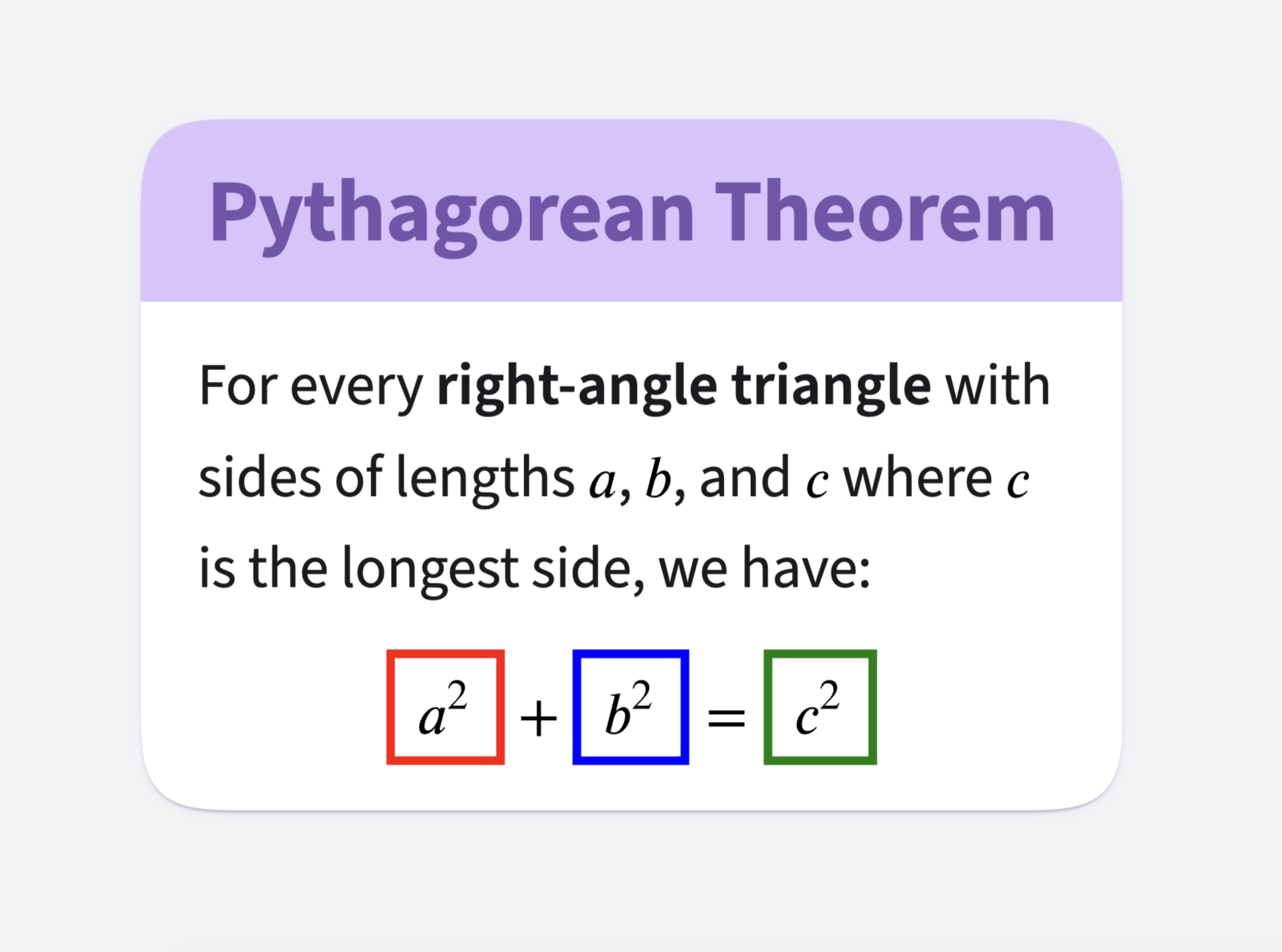
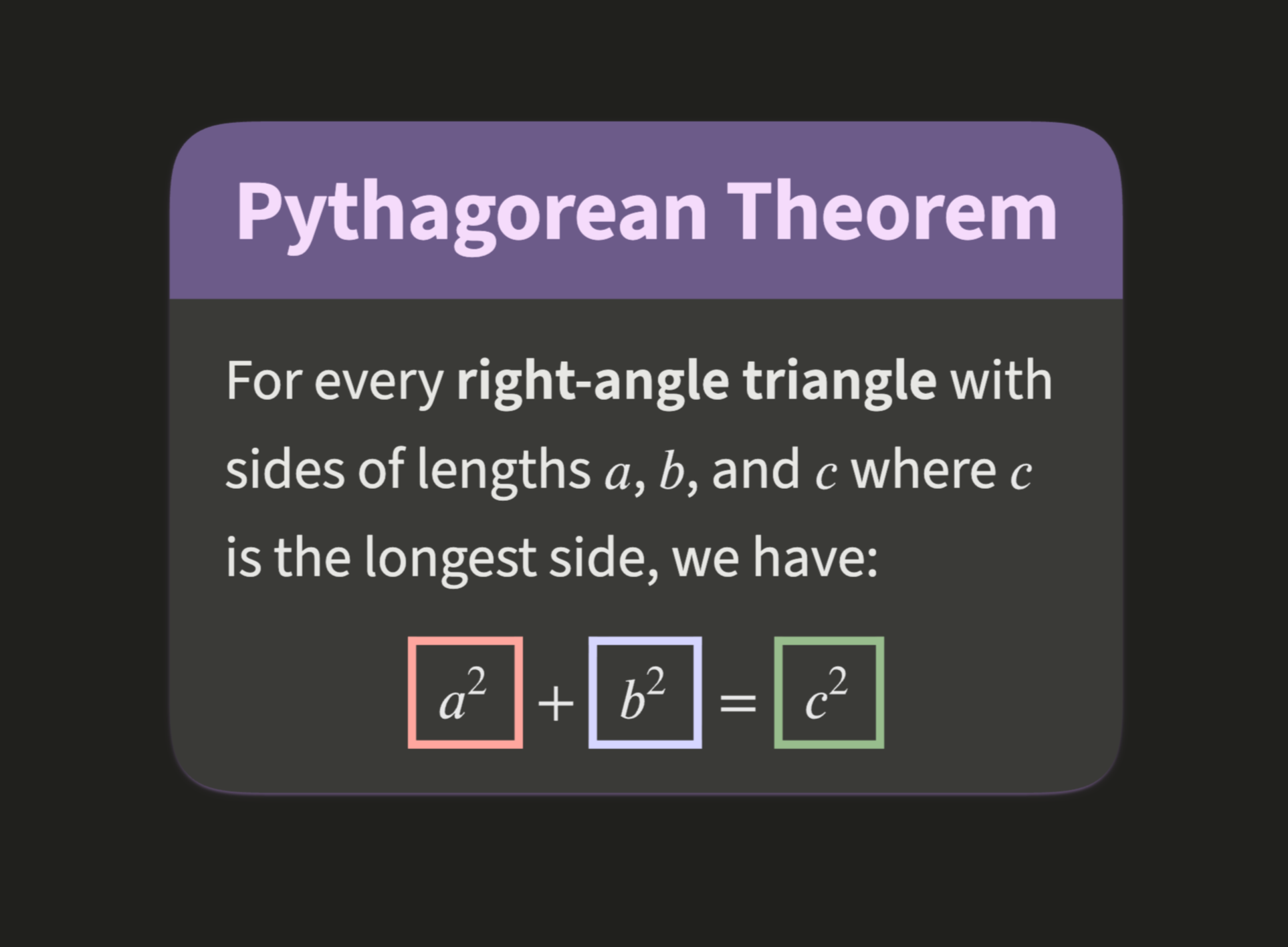
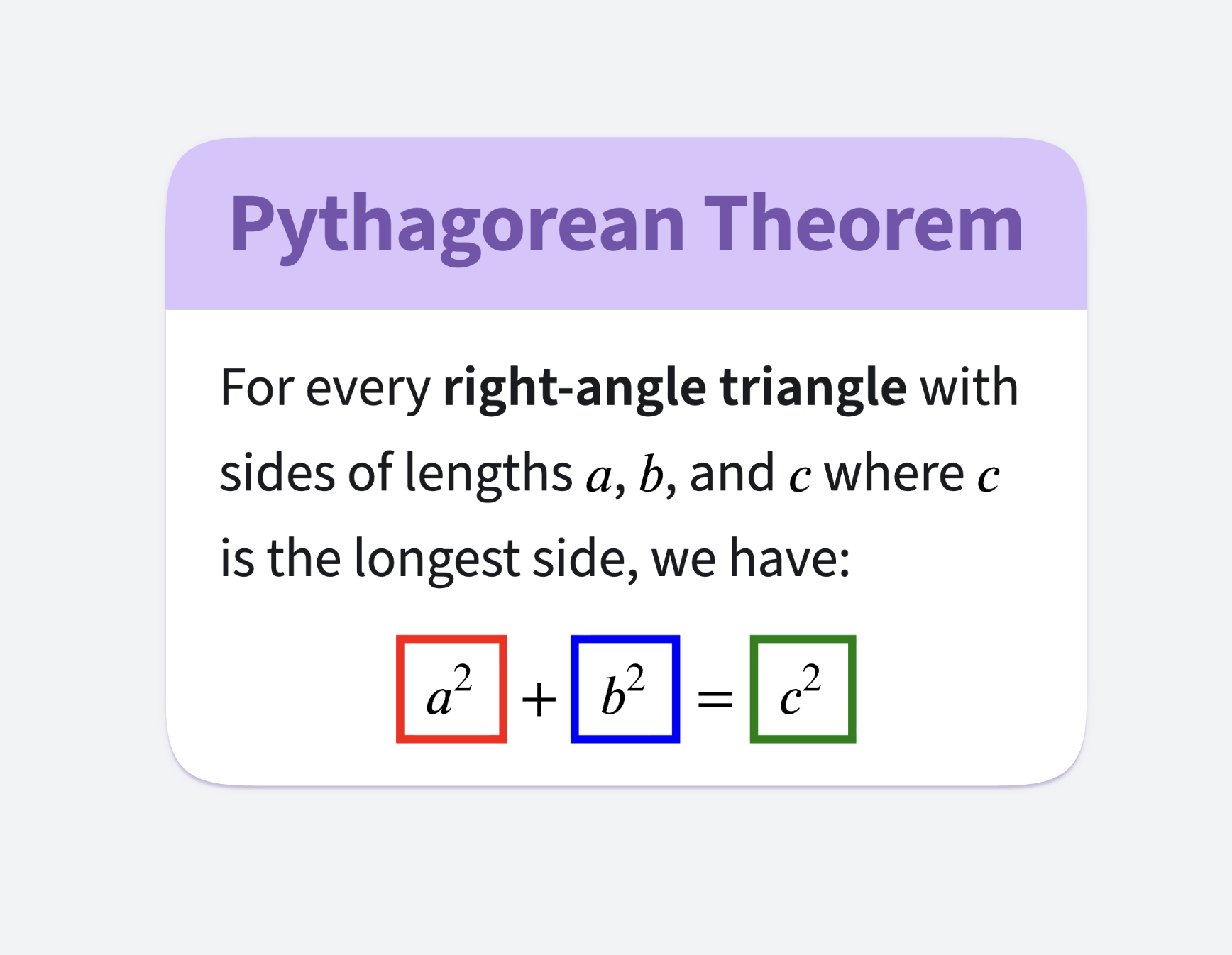
Here is the result for a cell about Pythagorean Theorem with three sides highlighted in different colors. It looks really good.
In OrgPad, most cells are rendered using a 2D canvas because it is much faster, looks better, and uses less memory than browser's DOM rendering.
For this rendering, we prerasterize SVG math formulas into offscreen canvas images. These are then drawn either into the onscreen canvas for the current frame or into offscreen canvas caches for individual cells. In dark mode, we therefore need a way to rasterize inverted math formulas.
Couldn't we just use ctx.filter property which works exactly as CSS filter property? Unfortunately, ctx.filter is not supported in Safari at the moment.
Luckily, we can achieve the same effect with SVG filters. Here is the dark mode version of the previously shown Pythagorean equation with highlighted changes:
<svg xmlns:xlink="http://www.w3.org/1999/xlink" width="524px" height="116px" style="vertical-align: -0.338ex;" viewBox="0 -1006.6 5121.2 1152.1" role="img" focusable="false" xmlns="http://www.w3.org/2000/svg">
    <defs>
        <filter id="dm" color-interpolation-filters="sRGB">
            <feComponentTransfer result="s1">
                <feFuncR type="linear" slope="-0.4" intercept="0.7"></feFuncR>
                <feFuncG type="linear" slope="-0.4" intercept="0.7"></feFuncG>
                <feFuncB type="linear" slope="-0.4" intercept="0.7"></feFuncB>
                <feFuncA type="identity"></feFuncA>
            </feComponentTransfer>
            <feColorMatrix in="s1" result="s2" type="hueRotate" values="180">
            </feColorMatrix>
            <feComponentTransfer in="s2" result="s3">
                <feFuncR type="linear" slope="1.2"></feFuncR>
                <feFuncG type="linear" slope="1.2"></feFuncG>
                <feFuncB type="linear" slope="1.2"></feFuncB>
                <feFuncA type="identity"></feFuncA>
            </feComponentTransfer>
            <feComponentTransfer in="s3">
                <feFuncR type="linear" slope="1.2" intercept="-0.1"></feFuncR>
                <feFuncG type="linear" slope="1.2" intercept="-0.1"></feFuncG>
                <feFuncB type="linear" slope="1.2" intercept="-0.1"></feFuncB>
                <feFuncA type="identity"></feFuncA>
            </feComponentTransfer>
        </filter>
        <path stroke-width="1" id="E1-STIXWEBNORMALI-1D44E" d="M472 428l-91 -345s-1 -2 -1 -11c0 -11 6 -17 14 -17c10 0 25 2 64 54l12 -12c-31 -47 -85 -107 -133 -107c-33 0 -42 23 -42 55c0 13 6 34 11 50h-4c-72 -92 -134 -105 -173 -105c-63 0 -89 55 -89 119c0 132 132 332 276 332c43 0 64 -24 66 -46h1l9 33h80zM367 341 c0 41 -12 71 -50 71c-68 0 -128 -87 -162 -171c-18 -45 -28 -89 -28 -124c0 -53 31 -66 58 -66c69 0 139 95 167 190c8 26 15 66 15 100Z"></path>
        <path stroke-width="1" id="E1-STIXWEBMAIN-32" d="M474 137l-54 -137h-391v12l178 189c94 99 130 175 130 260c0 91 -54 141 -139 141c-72 0 -107 -32 -147 -130l-21 5c21 117 85 199 208 199c113 0 185 -77 185 -176c0 -79 -39 -154 -128 -248l-165 -176h234c42 0 63 11 96 67Z"></path>
        <path stroke-width="1" id="E1-STIXWEBMAIN-2B" d="M636 220h-261v-261h-66v261h-261v66h261v261h66v-261h261v-66Z"></path>
        <path stroke-width="1" id="E1-STIXWEBNORMALI-1D44F" d="M214 382l4 -4c33 32 72 63 121 63c70 0 111 -69 111 -151c0 -121 -109 -301 -266 -301c-53 0 -94 18 -139 48l144 563c1 4 2 8 2 11c-1 13 -16 21 -29 21c-10 0 -22 -1 -30 -4l-3 16l158 24zM179 252l-55 -215c0 -7 32 -19 55 -19c122 0 188 174 188 276 c0 70 -38 92 -71 92c-72 0 -106 -89 -117 -134Z"></path>
        <path stroke-width="1" id="E1-STIXWEBMAIN-3D" d="M637 320h-589v66h589v-66zM637 120h-589v66h589v-66Z"></path>
        <path stroke-width="1" id="E1-STIXWEBNORMALI-1D450" d="M363 111l12 -13c-51 -60 -113 -109 -198 -109c-97 0 -137 78 -137 155c0 140 121 297 263 297c50 0 97 -27 97 -76c0 -38 -16 -70 -54 -70c-26 0 -38 21 -38 38c0 24 29 36 29 58c0 12 -10 21 -34 21c-119 0 -176 -179 -176 -259c0 -87 49 -109 94 -109 c61 0 107 33 142 67Z"></path>
    </defs>
    <g filter="url(#dm)">
        <g stroke="currentColor" fill="currentColor" stroke-width="0" transform="matrix(1 0 0 -1 0 0)">
            <use xlink:href="#E1-STIXWEBNORMALI-1D44E" x="0" y="0"></use>
            <use transform="scale(0.707)" xlink:href="#E1-STIXWEBMAIN-32" x="710" y="583"></use>
            <use xlink:href="#E1-STIXWEBMAIN-2B" x="1178" y="0"></use>
            <g transform="translate(2086,0)">
                <use xlink:href="#E1-STIXWEBNORMALI-1D44F" x="0" y="0"></use>
                <use transform="scale(0.707)" xlink:href="#E1-STIXWEBMAIN-32" x="665" y="583"></use>
            </g>
            <use xlink:href="#E1-STIXWEBMAIN-3D" x="3288" y="0"></use>
            <g transform="translate(4251,0)">
                <use xlink:href="#E1-STIXWEBNORMALI-1D450" x="0" y="0"></use>
                <use transform="scale(0.707)" xlink:href="#E1-STIXWEBMAIN-32" x="587" y="583"></use>
            </g>
        </g>
    </g>
</svg>
The modified SVG image first introduces a new dm filter which inverts the colors. It works in four steps, exactly as CSS --math-filter described before:
Then the dm filter is applied to the entire SVG by wrapping it with <g filter="url(#dm)">.
We generate these dark mode SVGs dynamically in OrgPad's ClojureScript code. First, we describe the dm filter in Clojure Hiccup syntax:
(defn linear-color-filter
  "Computes linear color filter with the given input, output, slope and intercept."
  [in out slope intercept]
  [:feComponentTransfer {:in in :result out}
   [:feFuncR {:type "linear" :slope slope :intercept intercept}]
   [:feFuncG {:type "linear" :slope slope :intercept intercept}]
   [:feFuncB {:type "linear" :slope slope :intercept intercept}]
   [:feFuncA {:type "identity"}]])

(defn color-filter
  "Generates color filter for the given color invert, brightness and contrast."
  [invert hue-rotate brightness contrast]
  (let [invert-slope (math/round (- 1 (* 2 invert)) 2)
        contrast-intercept (math/round (* 0.5 (- 1 contrast)) 2)]
    [:filter {:id                          "dm"
              :color-interpolation-filters "sRGB"}
     (linear-color-filter nil "s1" invert-slope invert)
     [:feColorMatrix {:in     "s1"
                      :result "s2"
                      :type   "hueRotate"
                      :values hue-rotate}]
     (linear-color-filter "s2" "s3" brightness nil)
     (linear-color-filter "s3" nil contrast contrast-intercept)]))
Then we turn it into an HTML string:
(def dm-invert 0.7)
(def dm-brightness 1.2)
(def dm-contrast 1.2)
(def dm-hue-rotate 180)

(def dm-filter
  "Dark-mode SVG filter which mimics CSS filter, so it looks as close as possible
  to invert(0.7) hue-rotate(180deg) brightness(1.2) contrast(1.2)."
  (-> [:svg (color-filter dm-invert dm-hue-rotate dm-brightness dm-contrast)]
      hiccup/->html
      (str-util/remove-prefix-suffix "<svg>" "</svg>")))
Finally, we just insert the dm filter into an input SVG string. Note that we are converting the original size in ex units, generated by MathJax, into canvas pixels; otherwise SVG rasterization in Safari looks horrible.
(defn add-dark-mode-filter
  "Adds dark-mode filter to the given math SVG generated by MathJaX.
   Size is rewritten from ex to canvas px size to fix broken rasterization
   of dark mode math in Safari."
  [svg width height]
  (-> svg (str/replace-first #"width=\"[^\"]*\"\s+height=\"[^\"]*\""
                             (str "width=\"" width "px\" height=\"" height "px\""))
      (str/replace "<defs>" (str "<defs>\n" dm-filter))
      (str/replace "</defs>" "</defs>\n<g filter=\"url(#dm)\">")
      (str/replace "</svg>" "</g>\n</svg>")))
Our solution is a little bit hacky. It relies on the particular structure of SVGs generated by MathJax, doing string and regexp replacements. A more robust approach is to parse SVG into Hiccup, transform it there, and then convert it back into an HTML string.
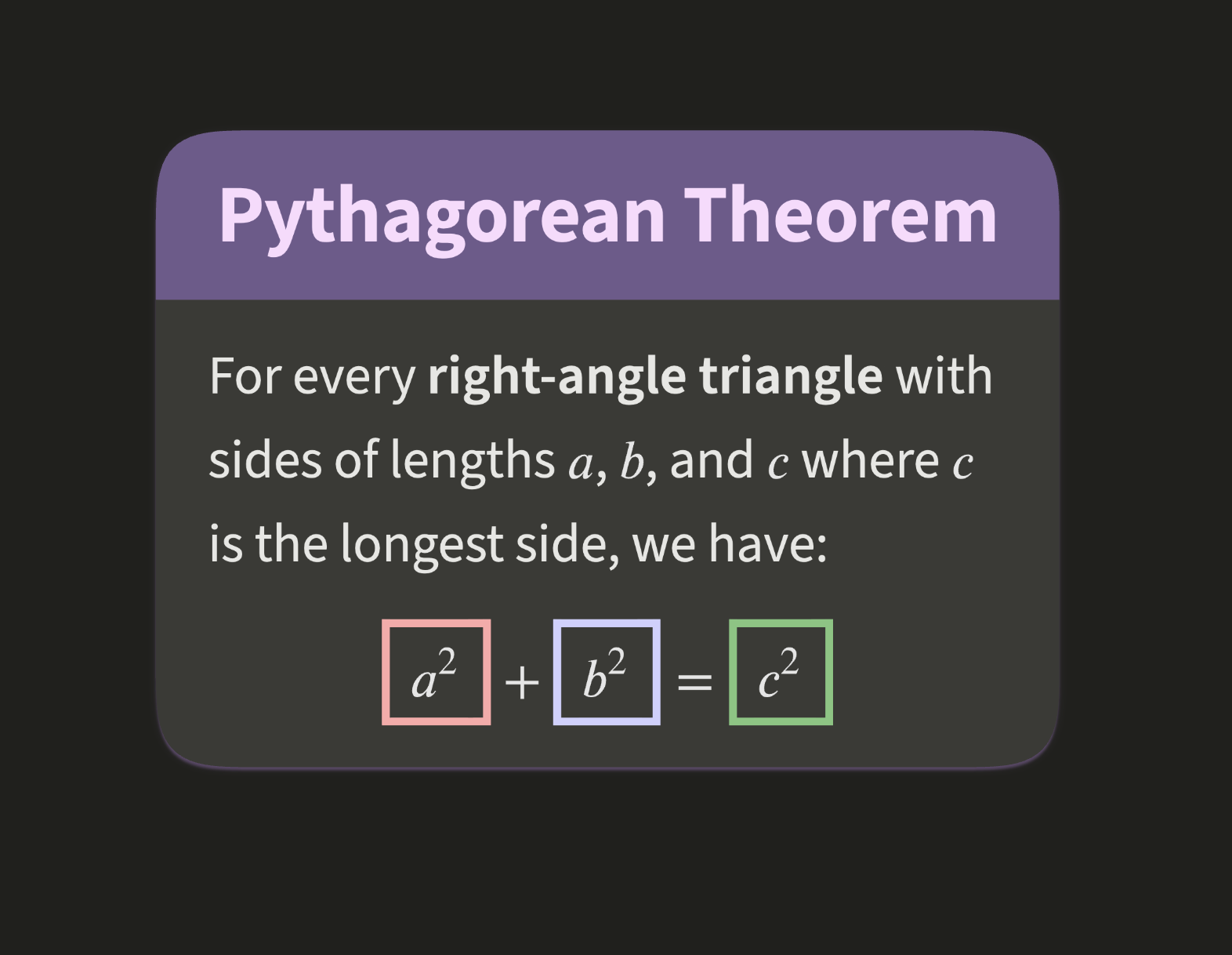
Here is the cell about the Pythagorean Theorem rendered into a 2D canvas. If you don't notice any difference, that's a good sign. We wanted both renderings to look as close to each other as possible.
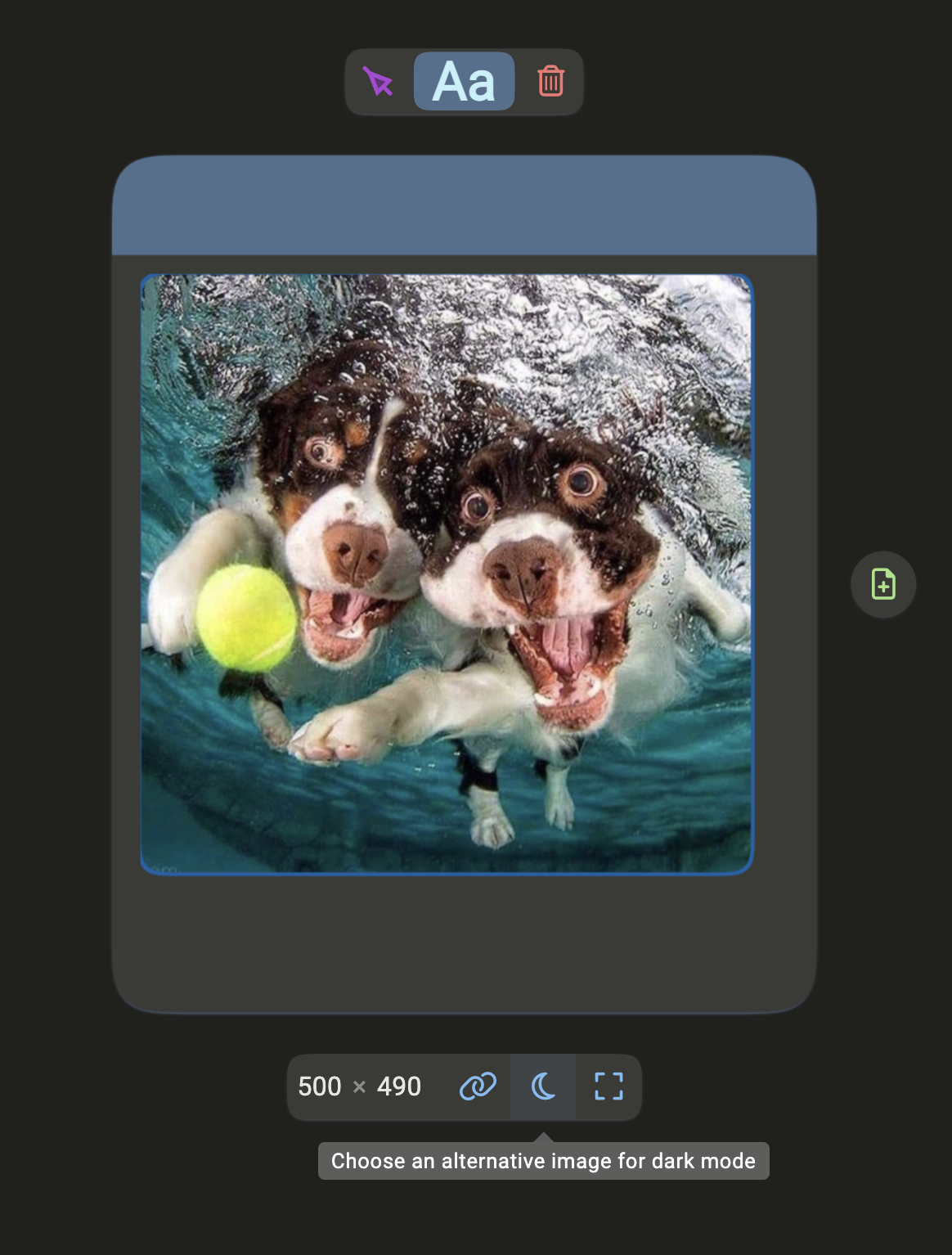
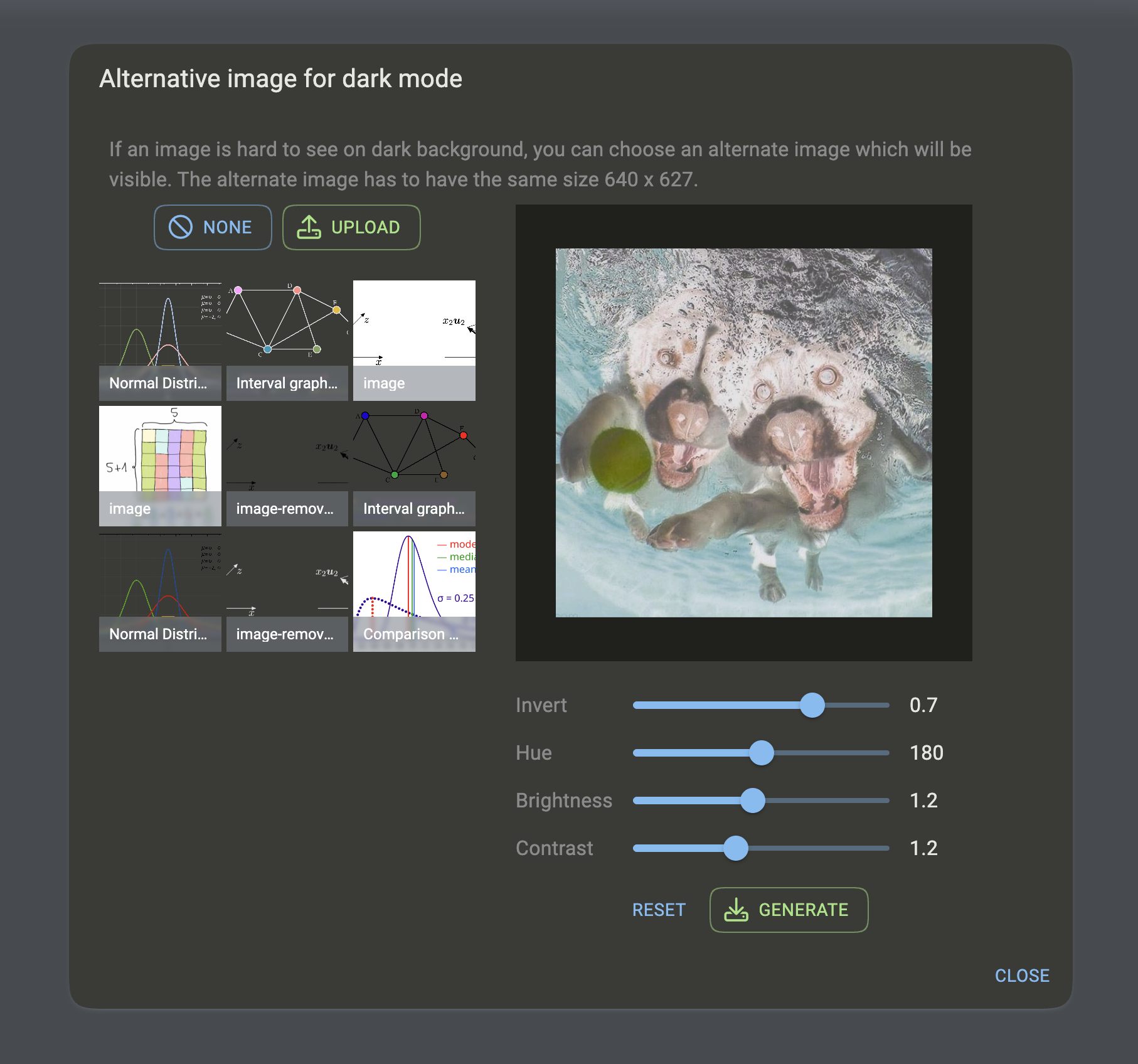
We cannot apply the same approach to user uploaded images. For example, we usually do not want to modify photos at all. Still, some images can look quite bad in dark mode, especially when placed directly on the background canvas.
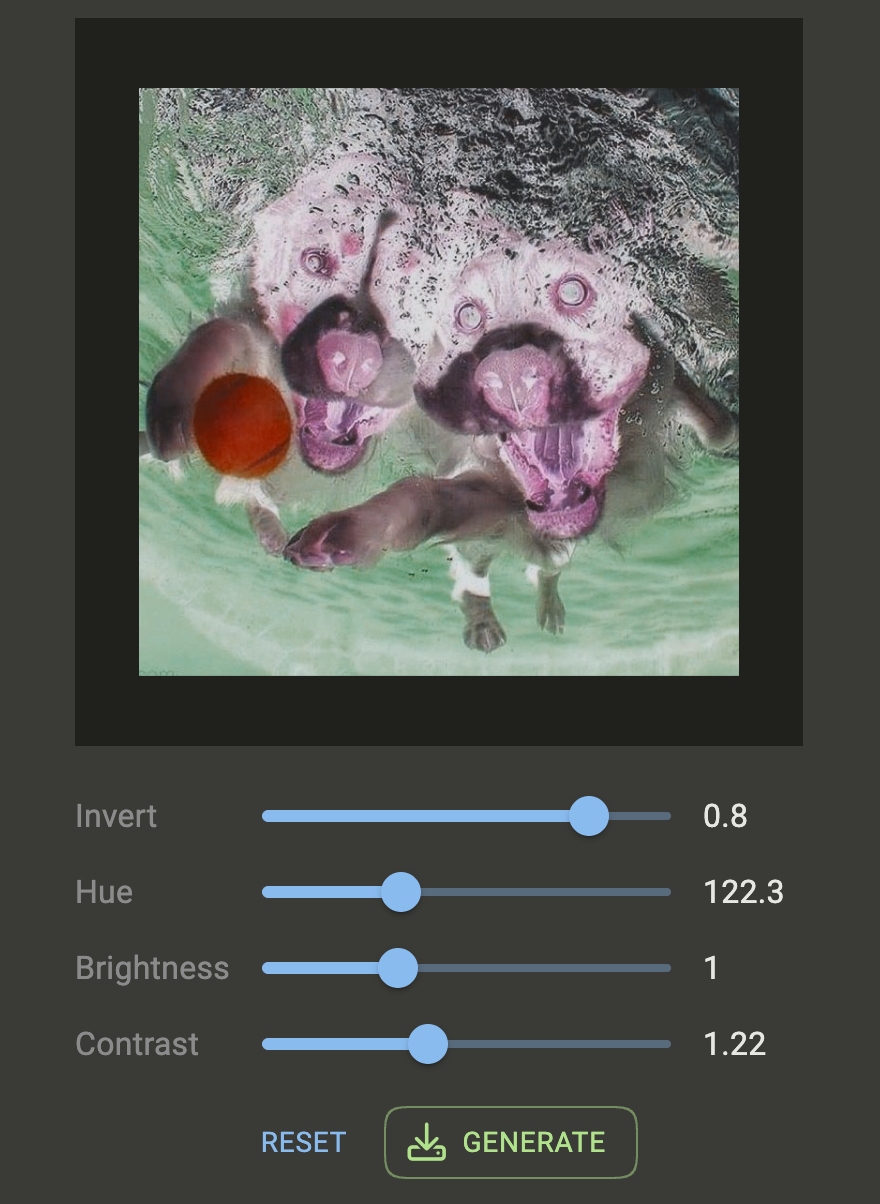
Our solution is to let users choose an alternative version of the image for dark mode. In the editor, we even provide a quick generator for creating such images.
We use a similar idea here as well: we wrap an arbitrary image with a dm SVG filter. We first download the processed image in JS and convert it to a base64 string. This is done by the following Re-frame effect:
(rf/reg-fx
  :fetch/as-data-url
  (fn [url-event-pairs]
    (doseq [[url event] url-event-pairs]
      (-> (js/fetch url)
          (.then #(.blob %))
          (.then (fn [blob]
                   (js/Promise.
                     (fn [resolve reject]
                       (let [r (js/FileReader.)]
                         (set! (.-onload r) (fn [_] (resolve (.-result r))))
                         (set! (.-onerror r) (fn [_] (reject (.-error r))))
                         (.readAsDataURL r blob))))))
          (.then #(rf-util/dispatch event %))))))
We then generate an SVG image with the dm filter for the selected values of invert, hue-rotate, brightness, and contrast. The SVG contains the converted image as a base64-encoded <image> element.
<svg xmlns="http://www.w3.org/2000/svg" width="640" height="627" viewBox="0 0 640 627">
    <defs>
        <filter id="dm" color-interpolation-filters="sRGB">
            <feComponentTransfer result="s1">
                <feFuncR type="linear" slope="-0.6" intercept="0.8"></feFuncR>
                <feFuncG type="linear" slope="-0.6" intercept="0.8"></feFuncG>
                <feFuncB type="linear" slope="-0.6" intercept="0.8"></feFuncB>
                <feFuncA type="identity"></feFuncA>
            </feComponentTransfer>
            <feColorMatrix in="s1" result="s2" type="hueRotate" values="122.3">
            </feColorMatrix>
            <feComponentTransfer in="s2" result="s3">
                <feFuncR type="linear" slope="1"></feFuncR>
                <feFuncG type="linear" slope="1"></feFuncG>
                <feFuncB type="linear" slope="1"></feFuncB>
                <feFuncA type="identity"></feFuncA>
            </feComponentTransfer>
            <feComponentTransfer in="s3">
                <feFuncR type="linear" slope="1.22" intercept="-0.11"></feFuncR>
                <feFuncG type="linear" slope="1.22" intercept="-0.11"></feFuncG>
                <feFuncB type="linear" slope="1.22" intercept="-0.11"></feFuncB>
                <feFuncA type="identity"></feFuncA>
            </feComponentTransfer>
        </filter>
    </defs>
    <image href="data:image/jpeg;base64,/9j/4AAQSkZJRgABAgAA........270UUFrY//Z"
           x="0" y="0" width="640" height="627" filter="url(#dm)"></image>
</svg>
When the user clicks the generate button, we create a canvas of the correct size, rasterize the SVG image into it and save the result to the server.
(defn generate-dm-image
  "Generates dark-mode image for the chosen parameters and uploads
   it to the server as a PNG."
  [effects]
  (if-let [edited-page-id (db-get/edited-page-id effects)]
    (let [{:editor-selection/keys [image-id]} (db-get/editor-selection
                                                effects edited-page-id)
          {:image/keys [thumbnail-sizes title]} (db-get/image effects image-id)
          {:thumbnail/keys [width height]} (first thumbnail-sizes)
          canvas (draw/create-canvas! width height)
          ctx (draw/get-context! canvas)
          image (util-js/element "dm-preview")]
      (draw/image! ctx image [0 0] [width height])
      (.toBlob canvas (fn [blob]
                        (draw/release-canvas! canvas)
                        (let [file (js/File. #js[blob] (str title " dark mode.png")
                                             #js{:type "image/png"})]
                          (data-transfer/process-file-upload
                            [file] :unit-editor/dm-image nil))))
      (db-update/dm-src effects assoc :dm-src/generating true))
    effects))
It would not be much more difficult to add a basic image editor to OrgPad, and it would be very useful. We definitely plan to add one in the future.