Created by Pavel Klavík
A high-level explanation of how physics-based motion makes a spatial canvas feel continuous, responsive, and understandable.
For  and
and  , the roots are

So the solution is  for some
  .
.
For the initial conditions  and
and  , we find
  and
and  by solving this linear system
![\left[\begin{array}{cc|c}1 & 1 & 1 \\ -1 & -2 & 1\end{array}\right]](data:image/svg+xml;base64,PHN2ZyB4bWxuczp4bGluaz0iaHR0cDovL3d3dy53My5vcmcvMTk5OS94bGluayIgd2lkdGg9IjE2Ljk5OWV4IiBoZWlnaHQ9IjcuNTA5ZXgiIHN0eWxlPSJ2ZXJ0aWNhbC1hbGlnbjogLTMuMTcxZXg7IiB2aWV3Qm94PSIwIC0xODY3LjcgNzMxOSAzMjMzLjIiIHJvbGU9ImltZyIgZm9jdXNhYmxlPSJmYWxzZSIgeG1sbnM9Imh0dHA6Ly93d3cudzMub3JnLzIwMDAvc3ZnIj4KPGRlZnM+CjxwYXRoIHN0cm9rZS13aWR0aD0iMSIgaWQ9IkUxLVNUSVhXRUJNQUlOLTVCIiBkPSJNMjk5IC0xNTZoLTIxMXY4MThoMjExdi0yNWgtODNjLTM0IDAgLTUyIC0xMiAtNTIgLTQ4di02NjZjMCAtNDAgMTkgLTU0IDUyIC01NGg4M3YtMjVaIj48L3BhdGg+CjxwYXRoIHN0cm9rZS13aWR0aD0iMSIgaWQ9IkUxLVNUSVhXRUJNQUlOLTMxIiBkPSJNMzk0IDBoLTI3NnYxNWM3NCA0IDk1IDI1IDk1IDgwdjQ0OWMwIDM0IC05IDQ5IC0zMCA0OWMtMTAgMCAtMjcgLTUgLTQ1IC0xMmwtMjcgLTEwdjE0bDE3OSA5MWw5IC0zdi01OTdjMCAtNDMgMjAgLTYxIDk1IC02MXYtMTVaIj48L3BhdGg+CjxwYXRoIHN0cm9rZS13aWR0aD0iMSIgaWQ9IkUxLVNUSVhXRUJNQUlOLTIyMTIiIGQ9Ik02MjEgMjIwaC01NTd2NjZoNTU3di02NloiPjwvcGF0aD4KPHBhdGggc3Ryb2tlLXdpZHRoPSIxIiBpZD0iRTEtU1RJWFdFQk1BSU4tMzIiIGQ9Ik00NzQgMTM3bC01NCAtMTM3aC0zOTF2MTJsMTc4IDE4OWM5NCA5OSAxMzAgMTc1IDEzMCAyNjBjMCA5MSAtNTQgMTQxIC0xMzkgMTQxYy03MiAwIC0xMDcgLTMyIC0xNDcgLTEzMGwtMjEgNWMyMSAxMTcgODUgMTk5IDIwOCAxOTljMTEzIDAgMTg1IC03NyAxODUgLTE3NmMwIC03OSAtMzkgLTE1NCAtMTI4IC0yNDhsLTE2NSAtMTc2aDIzNGM0MiAwIDYzIDExIDk2IDY3WiI+PC9wYXRoPgo8cGF0aCBzdHJva2Utd2lkdGg9IjEiIGlkPSJFMS1TVElYV0VCTUFJTi01RCIgZD0iTTI0NSAtMTU2aC0yMTF2MjVoODhjMzUgMCA0NyAxNSA0NyA0NnY2NjhjMCAzNSAtMTMgNTQgLTUxIDU0aC04NHYyNWgyMTF2LTgxOFoiPjwvcGF0aD4KPHBhdGggc3Ryb2tlLXdpZHRoPSIxIiBpZD0iRTEtU1RJWFdFQlNJWkU0LTVCIiBkPSJNNjM0IC01MDloLTMzOXYzMDc1aDMzOXYtNTZoLTI0NHYtMjk2M2gyNDR2LTU2WiI+PC9wYXRoPgo8cGF0aCBzdHJva2Utd2lkdGg9IjEiIGlkPSJFMS1TVElYV0VCU0laRTQtNUQiIGQ9Ik0zNjYgLTUwOWgtMzM5djU2aDI0NHYyOTYzaC0yNDR2NTZoMzM5di0zMDc1WiI+PC9wYXRoPgo8L2RlZnM+CjxnIHN0cm9rZT0iY3VycmVudENvbG9yIiBmaWxsPSJjdXJyZW50Q29sb3IiIHN0cm9rZS13aWR0aD0iMCIgdHJhbnNmb3JtPSJtYXRyaXgoMSAwIDAgLTEgMCAwKSI+CiA8dXNlIHhsaW5rOmhyZWY9IiNFMS1TVElYV0VCU0laRTQtNUIiIHg9IjAiIHk9Ii03NzkiPjwvdXNlPgo8ZyB0cmFuc2Zvcm09InRyYW5zbGF0ZSg4MjgsMCkiPgo8ZyB0cmFuc2Zvcm09InRyYW5zbGF0ZSgzODksMCkiPgogPHVzZSB4bGluazpocmVmPSIjRTEtU1RJWFdFQk1BSU4tMzEiIHg9IjM0MiIgeT0iNjUwIj48L3VzZT4KPGcgdHJhbnNmb3JtPSJ0cmFuc2xhdGUoMCwtNzUwKSI+CiA8dXNlIHhsaW5rOmhyZWY9IiNFMS1TVElYV0VCTUFJTi0yMjEyIiB4PSIwIiB5PSIwIj48L3VzZT4KIDx1c2UgeGxpbms6aHJlZj0iI0UxLVNUSVhXRUJNQUlOLTMxIiB4PSI2ODUiIHk9IjAiPjwvdXNlPgo8L2c+CjwvZz4KPGcgdHJhbnNmb3JtPSJ0cmFuc2xhdGUoMjU3NSwwKSI+CiA8dXNlIHhsaW5rOmhyZWY9IiNFMS1TVElYV0VCTUFJTi0zMSIgeD0iMzQyIiB5PSI2NTAiPjwvdXNlPgo8ZyB0cmFuc2Zvcm09InRyYW5zbGF0ZSgwLC03NTApIj4KIDx1c2UgeGxpbms6aHJlZj0iI0UxLVNUSVhXRUJNQUlOLTIyMTIiIHg9IjAiIHk9IjAiPjwvdXNlPgogPHVzZSB4bGluazpocmVmPSIjRTEtU1RJWFdFQk1BSU4tMzIiIHg9IjY4NSIgeT0iMCI+PC91c2U+CjwvZz4KPC9nPgo8bGluZSBzdHJva2UtbGluZWNhcD0ic3F1YXJlIiBzdHJva2Utd2lkdGg9IjIwLjkiIHkxPSIxMCIgeDI9IjEwIiB4MT0iMTAiIHkyPSIyODIwIiB0cmFuc2Zvcm09InRyYW5zbGF0ZSg0MjYxLC0xMTY2KSI+PC9saW5lPgo8ZyB0cmFuc2Zvcm09InRyYW5zbGF0ZSg0NzYxLDApIj4KIDx1c2UgeGxpbms6aHJlZj0iI0UxLVNUSVhXRUJNQUlOLTMxIiB4PSIwIiB5PSI2NTAiPjwvdXNlPgogPHVzZSB4bGluazpocmVmPSIjRTEtU1RJWFdFQk1BSU4tMzEiIHg9IjAiIHk9Ii03NTAiPjwvdXNlPgo8L2c+CjwvZz4KIDx1c2UgeGxpbms6aHJlZj0iI0UxLVNUSVhXRUJTSVpFNC01RCIgeD0iNjY1NyIgeT0iLTc3OSI+PC91c2U+CjwvZz4KPC9zdmc+)
This gives  and
and  , so the full spring trajectory is

For fixed parameters  and
and  , we get a family of possible solutions, one for each choice of .
A particular solution is obtained by computing and from the initial position  and velocity
  . This requires solving a
  system of linear equations.
This lets an animation continue smoothly when its target changes mid-motion. The engine takes the current position and velocity, and uses them as the starting point for the next spring animation.
 :
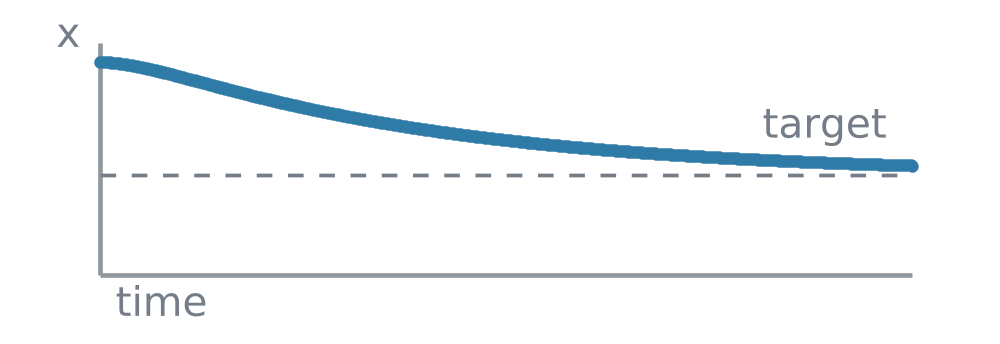
:Usually calm, monotone movement with no repeated overshoot. It is useful when an animation should feel stable and restrained.


 :
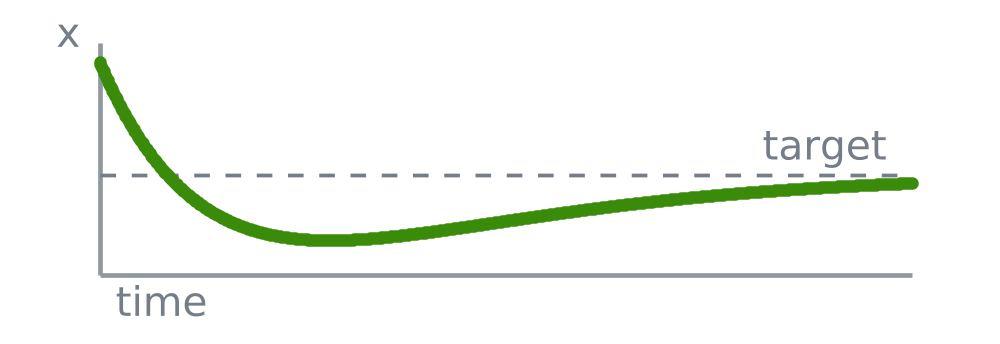
:The fastest calm movement that settles without repeated wobbling. It is useful when the interface should feel direct but not jumpy.

Spring animations make OrgPad feel natural. Objects move in ways we recognize from everyday life. The animation stays out of the way and helps you follow what changed in the document.
OrgPad uses a custom animation library with roughly 5,000 lines of ClojureScript to orchestrate detailed animations throughout the app.
The differential equation for spring motion is:

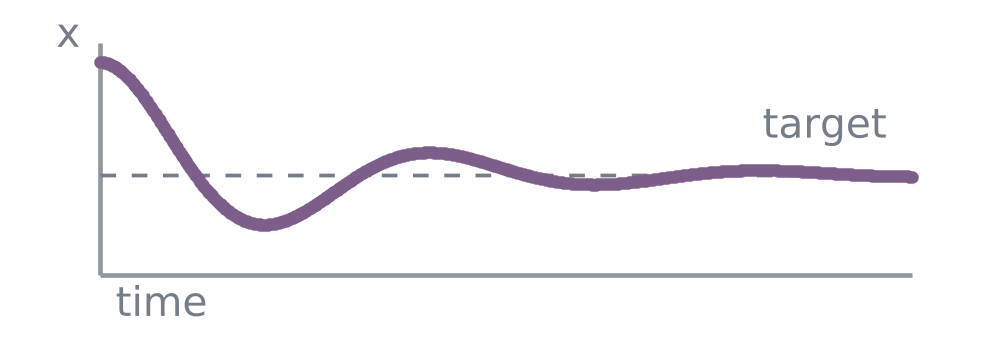
Depending on the value of  , the solution takes one of three forms.
 :
:Lively movement that can cross the target repeatedly before settling. Used sparingly in the OrgPad interface.


OrgPad’s animation layer works more like a small game engine than a traditional document redraw system. While objects move, it runs a fast render loop: each frame advances the animation state, updates what's visible, and renders the result.
During each frame, OrgPad:
The loop is driven by browser animation frames:
(when start-playing
  (.requestAnimationFrame js/window
    #(dispatch! [:frame-anim/set-frame %])))
Profiles are named choices of stiffness and damping . The animation engine computes the motion type and eigenvalues from these numbers.
{:spring/id          :spring/canvas-camera
 :spring/stiffness   55
 :spring/damping     25
 :spring/type        :spring/overdamped
 :spring/eigenvalues [-2.437694101250946 -22.562305898749052]}
{:spring/id          :spring/unit-drag
 :spring/stiffness   850
 :spring/damping     98
 :spring/type        :spring/overdamped
 :spring/eigenvalues [-9.617262664969566 -88.38273733503044]}
{:spring/id          :spring/unit-pulse
 :spring/stiffness   150
 :spring/damping     6
 :spring/type        :spring/underdamped
 :spring/eigenvalues [-3 11.874342087037917]}
{:spring/id          :spring/panel-opacity
 :spring/stiffness   64
 :spring/damping     16
 :spring/type        :spring/critically-damped
:spring/eigenvalues [-8]}Dragging, camera movement, feedback pulses, and opening content should not all move the same way.
Spring physics lets OrgPad tune motion with two meaningful quantities:
controls how strongly the movement is pulled toward the target. Higher stiffness feels faster and more direct. controls how much the movement slows down near the target. Higher damping feels calmer and reduces bouncing.